tvc.collaboration.appServerNotificationStrategy = ehcache | http
Workflow - Administration Guide
21 March 2016
1. Legal Notes
© Copyright 2003-2016 by TechniaTranscat AB
All rights reserved.
PROPRIETARY RIGHTS NOTICE: This documentation is proprietary property of TechniaTranscat AB. In accordance with the terms and conditions of the Software License Agreement between the Customer and TechniaTranscat AB, the Customer is allowed to print as many copies as necessary of documentation copyrighted by TechniaTranscat relating to the software being used. This documentation shall be treated as confidential information and should be used only by employees or contractors with the Customer in accordance with the Agreement.
This product includes software developed by the Apache Software Foundation. (http://www.apache.org/).
2. Introduction
The TVC Workflow feature adds a set of functionality that allows users to collaborate around ENOVIA™ process in various ways. Some of the features are:
-
Workflows in context of ENOVIA™ objects
-
Real time notifications on workflow events
-
Inbox to view received tasks
-
Approve or reject a task
2.1. System Requirements
The following is a list of the requirements for the installation of this TVC. If your system is different, consult Technia before installing. For best performance it is recommended to use the latest version of browsers and application servers.
-
Supported ENOVIA™ versions
-
V6R2013
-
V6R2013X
-
V6R2014
-
V6R2014X
-
V6R2015X
-
-
Supported Browsers
-
Internet Explorer 10 and 11
-
Mozilla Firefox (current and prior major release)
-
Chrome (current and prior major release)
-
-
Application Server according to the ENOVIA™ core product requirements that is also in the list of supported platforms for the Atmosphere framework (see disclaimer below).
-
If you are using multiple application servers, you must read the next chapter.
-
-
For the Exalead™ powered features you need to install and setup Exalead
Disclaimer: This feature uses a framework called Atmosphere for sending notifications from the server to the clients. This framework supports a wide range of browser and app servers. We will not be able to add support for browsers and/or app servers that is outside of this frameworks support. Also we might not be able to fix issues that could appear in the usage of this framework. See following pages for a list of this frameworks supported platforms and known issues:
2.2. Multiple Application Servers
Many environments are scaled horizontally to support a larger amount of users. When having > 1 application server you need to use a load balancer that can divide the users across these application servers somehow.
The Collaboration component uses the web socket technology for setting up persistent connections between clients and servers and this technology has a completely different analogy than the traditional request/response paradigm used in HTTP/HTTPS communication. This will have some impact on your infrastructure since your load-balancer must be able to deal with web sockets correctly.
| Technia cannot support every possible infrastructure combination. We can however share information how we have tested it, on what software’s and our configurations. To enable this feature in your own environment / setup-combination you must consult the documentation of your infrastructure components. |
2.3. App-to-App-Server Communication
Since users in fact are connected to different application servers, but still should be able to receive notifications from other users – there is a need for the application servers to be able to speak with each other.
There are currently two different implementations available that solves this, one of the implementation uses HTTP communication between the servers and the second implementation uses the Open Source library named Ehcache. The latter is the default communication strategy.
The choice of strategy is defined with a TVC init-parameter. The name of the parameter and the possible values are shown below:
2.3.1. Ehcache™
The Ehcache™ component allows us to setup caches which are replicated among all the other application servers in the same cluster. This replication is done via the RMI protocol and each application server in the cluster is joining a TCP multicast-group.
The strategy of this implementation will try to automatically setup the network communication, but, there are some init-parameters that you may want to fine-tune for some reason or other.
For example, the port that we bind to is automatically picked by selecting a random free port within a specified range. Most likely, you want to define the port manually and in some cases also the network interface to bind to. If your host has multiple network interfaces you might need to specify the host name also. By default, the host name is resolved via the Java API:
InetAddress.getLocalHost().getHostAddress()
Defining the port and host can be done either with JVM system parameters OR TVC init parameters. The parameter name is the same regardless if you define them as a JVM system parameter or as a TVC init parameter. Below is an example how to define as JVM system parameter.
-Dtvc.collaboration.cache.listener.hostName=172.16.16.100
-Dtvc.collaboration.cache.listener.port=2010
The table below shows the additional TVC init parameters that you may want to change in some cases.
| Init Parameter Name | Description | Default Value |
|---|---|---|
tvc.collaboration.cache.listener.portRangeStart |
If you have defined a port explicitly as described above, this parameter can be ignored. Defines the lowest port number that we will try to use. |
4001 |
tvc.collaboration.cache.listener.portRangeEnd |
See above. Defines the highest port number that we might use. |
41020 |
tvc.collaboration.cache.listener.socketTimeoutMillis |
The number of milli-seconds client sockets will wait when sending messages to this listener until they give up. |
2000 |
tvc.collaboration.cache.provider.multicastGroupAddress |
The multi-cast address to be used. |
230.0.0.1 |
tvc.collaboration.cache.provider.multicastGroupPort |
The multi-cast port to be used. |
446 |
tvc.collaboration.cache.provider.timeToLive |
You can control how far the multicast packets propagate by this setting. Using the multicast IP protocol, the timeToLive value indicates the scope or range in which a packet may be forwarded. By convention:
|
1 |
2.3.2. HTTP Communication
When selecting the HTTP communication approach, each app-server must be able to connect to the other app server(s) in the cluster via HTTP. The implementation will try to identify the URL of the Application server automatically, but, this might in many cases fail due to the setup of load-balancers / proxies and hence you must inform each application server about their own HTTP address. This is done easiest by providing a JVM system parameter to the application server as shown below:
-Dtvc.collaboration.appServerURL=http://the-appserver-machine:8080/enovia
2.4. Test Scenario
Technia have during the development of the Collaboration component tested on a setup using an Apache HTTPD server acting as a load-balancer and behind having a couple of app servers running Apache Tomcat. All on a Windows 7 host.
The Apache HTTPD server has lately improved their support for web-socket tunneling, and we were using the version 2.4.10.VC11 (64 bit).
The Apache Tomcat versions were 7.0.56 (64 bit).
Below are the configurations we made. Note that we only provide these as examples and you should and might need to adjust them to your needs.
2.4.1. Apache HTTPD Configuration
The modules we explicitly enabled were:
-
proxy_module
-
proxy_ajp_module
-
proxy_balancer_module
-
proxy_wstunnel_module
-
lbmethod_byrequests_module
-
lbmethod_bytraffic_module
-
slotmem_shm_module
Proxy configuration
<Proxy balancer://ws>
BalancerMember ws://inv3373:8080 route=t8009
BalancerMember ws://inv3373:8081 route=t8010
ProxySet lbmethod=bytraffic
ProxySet stickysession=JSESSIONID
</Proxy>

ProxyPass /enovia/collaboration/communication balancer://ws/enovia/collaboration/communication

<Proxy balancer://ajp>
BalancerMember ajp://inv3373:8009 loadfactor=1 route=t8009
BalancerMember ajp://inv3373:8010 loadfactor=1 route=t8010
ProxySet lbmethod=bytraffic
ProxySet stickysession=JSESSIONID
</Proxy>

ProxyPass /enovia balancer://ajp/enovia
2.4.2. Tomcat Configuration
Each Tomcat instance were started up using a dedicated start script. Since they were all running on the same machine, we had to configure the ports per instance.
In that start script we configured a number of CATALINA_OPTS as shown
below.
set CATALINA_OPTS=-Dtvc.collaboration.appServerURL=http://localhost:8080/enovia
set CATALINA_OPTS=%CATALINA_OPTS% -Dtomcat.server.port=8005
set CATALINA_OPTS=%CATALINA_OPTS% -Dtomcat.http.port=8080
set CATALINA_OPTS=%CATALINA_OPTS% -Dtomcat.redirect.port=8443
set CATALINA_OPTS=%CATALINA_OPTS% -Dtomcat.ajp.port=8009
The Tomcat server.xml file were changed (note for readability, only changed parts included):
<Server port="${tomcat.server.port}"

<Connector port="${tomcat.http.port}" redirectPort="${tomcat.redirect.port}" />
<Connector port="${tomcat.ajp.port}" protocol="AJP/1.3" redirectPort="${tomcat.redirect.port}" />

<Engine name="Catalina" defaultHost="localhost" jvmRoute="t${tomcat.ajp.port}">
3. Installation
After installing TVC, you must perform three tasks in order to take this feature in to use.
3.1. Task 1 – Modifying emxNavigator.jsp
The first task is needed in order to include some functionality within the "emxNavigator.jsp" page (resides in the common folder in your application directory). The only change needed in this file, is to add a single line of code.
Just after the "body" element tag, add the line below (shown in bold):
<body ...>
<%@include file = "/tvc/collaboration/emxNavigator.jspf" %>
...
3.2. Task 2 – Modifying emxNavigatorDialog.jsp
The second task is needed in order to include some functionality within the "emxNavigatorDialog.jsp" page (resides in the common folder in your application directory). The only change needed in this file, is to add a single line of code.
Just after the "body" element tag, add the line below (shown in bold):
<body ...>
<%@include file = "/tvc/collaboration/emxNavigator.jspf" %>
...
3.3. Task 3 – web.xml
The third task needed is the registration of the Atmosphere servlet that is used for sending notifications from the server to the client (https://github.com/Atmosphere/atmosphere). The following lines should be added to web.xml
<servlet>
    <servlet-name>AtmosphereServlet</servlet-name>
    <servlet-class>org.atmosphere.cpr.AtmosphereServlet</servlet-class>
    <async-supported>true</async-supported>
    <init-param>
        <param-name>org.atmosphere.cpr.packages</param-name>
        <param-value>com.technia.tvc.collaboration.core.io</param-value>
    </init-param>
    <load-on-startup>5</load-on-startup>
</servlet>
<servlet-mapping>
    <servlet-name>AtmosphereServlet</servlet-name>
    <url-pattern>/collaboration/*</url-pattern>
</servlet-mapping>
4. Workflows
The workflow functionality allows you to create custom workflow process around any type of object in ENOVIA™. The workflow functionality is located in a side panel on the right side of the page content. This allows the users to create workflows around an object while still being able to navigate around the different pages of an object.
4.1. Workflow panel setup
The panel that contains the workflow functionality is located in the right side of the application. It is injected on the side of the page content so it will stay visible even when navigating around the different pages of an object. The panel is collapsed by default and will be expanded on click.
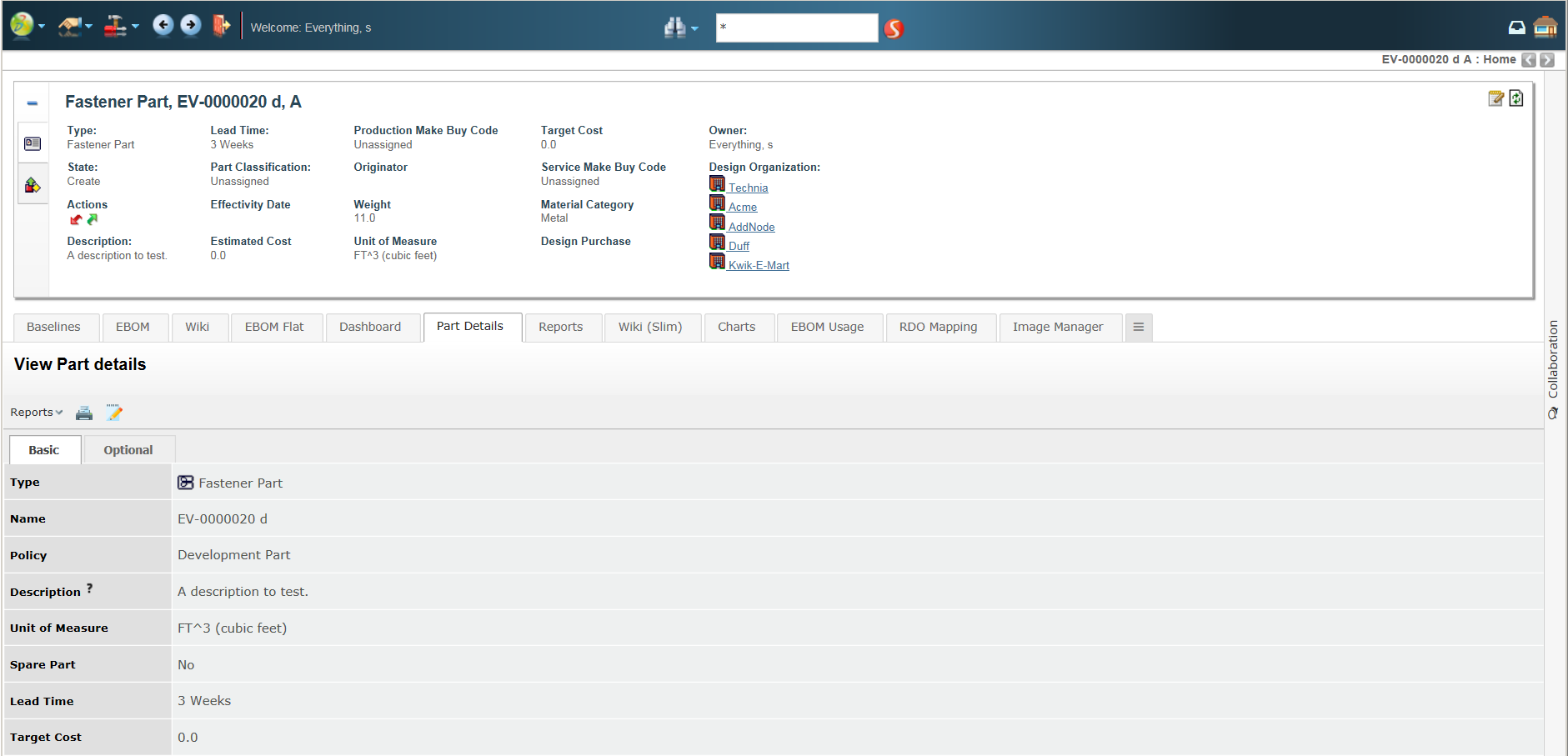
Figure 1. Collapsed workflow panel
After clicking on the panel it will be expanded towards the left side and show the workflows for the object that you are currently in context of.
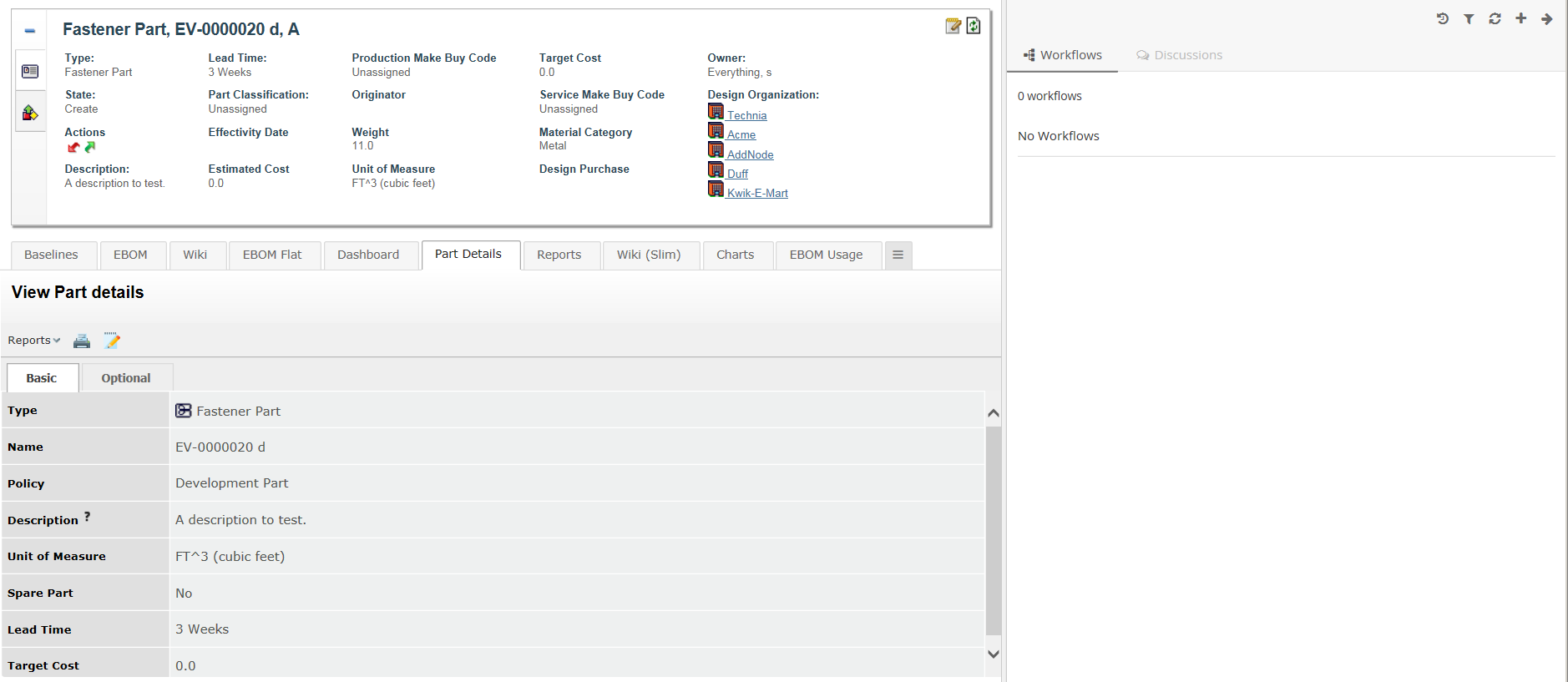
Figure 2. Expanded workflow panel
If you have not enabled the workflow functionality for some object types by configuration the panel will be grayed out and the user will not be able to expand it.
4.2. Viewing object workflows
When the user is standing in context of an object that has support enabled for workflows it will be possible to expand the discussion panel in order to view and/or create workflows. The default view of the panel will show a toolbar in the top and below that a list of all the workflows that has been started around the context object.
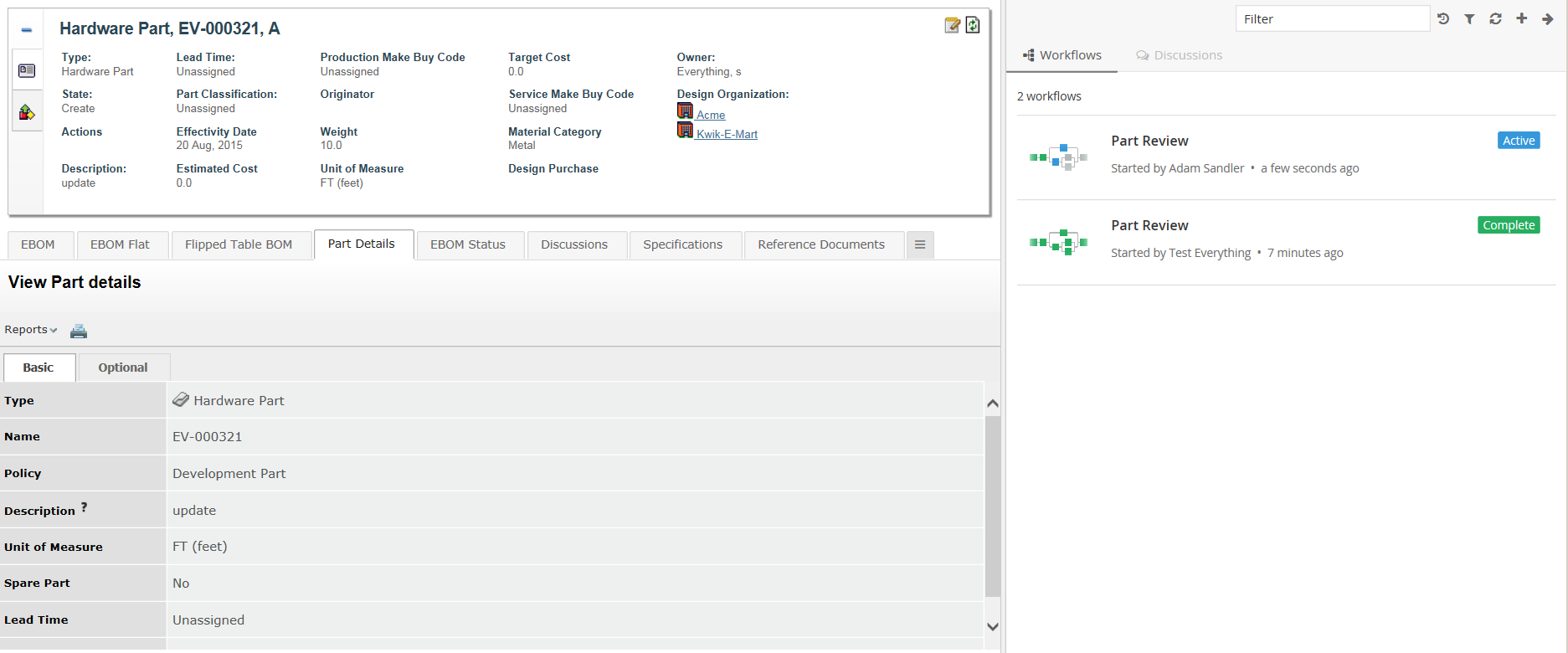
Figure 3. Listing context object workflows
Each workflow in the list is clickable. The entire workflow will be loaded when a user clicks on it. See next chapter for more details on that.
4.3. Viewing a workflow
When a workflow in the list has been clicked it will load the entire workflow in the panel. In this view the user will be able to see all the tasks in the workflow and also have the ability to assign or reassign or approve or complete or reject task.
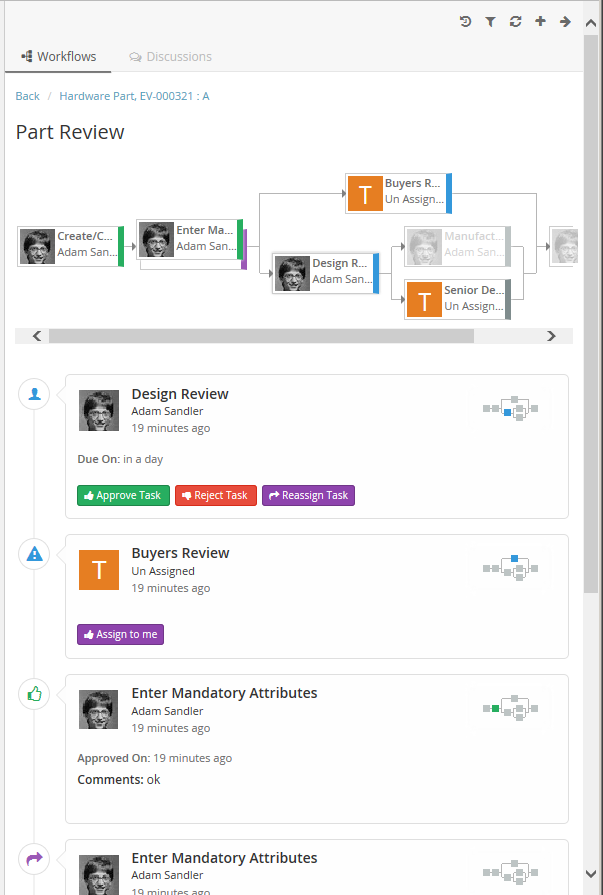
Figure 4. Showing a workflow
4.4. Creating a new workflow
In order to create a new workflow you use the action in the top toolbar (plus sign). That will launch a form that allows you enter the data needed to create a new workflow. When there are multiple configurations matching for the context object, chooser will be shown to choose a configuration.
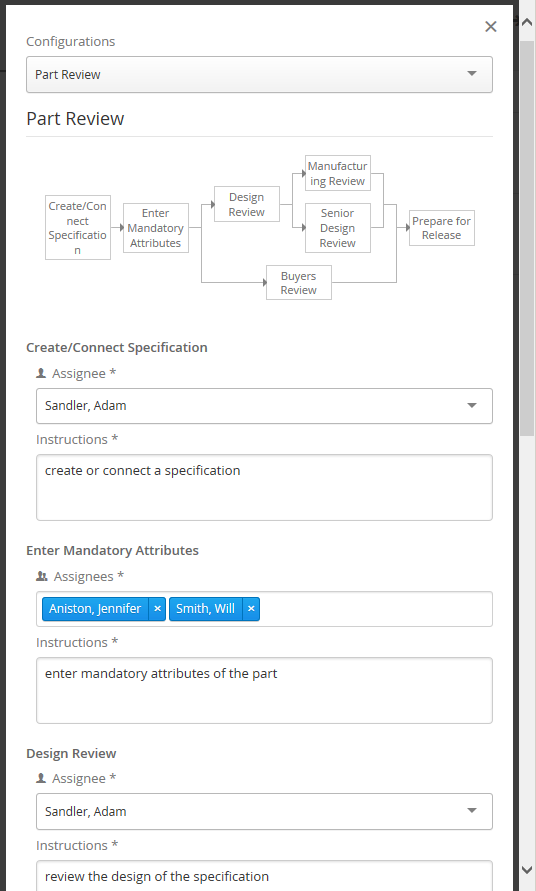
Figure 5. Creating a new workflow
The following data can be entered based on configuration:
-
Assignee for Tasks (Person or Role or Group or Custom Assignee)
-
Field values for Tasks if configured (e.g. Instructions)
4.5. Reassigning a task
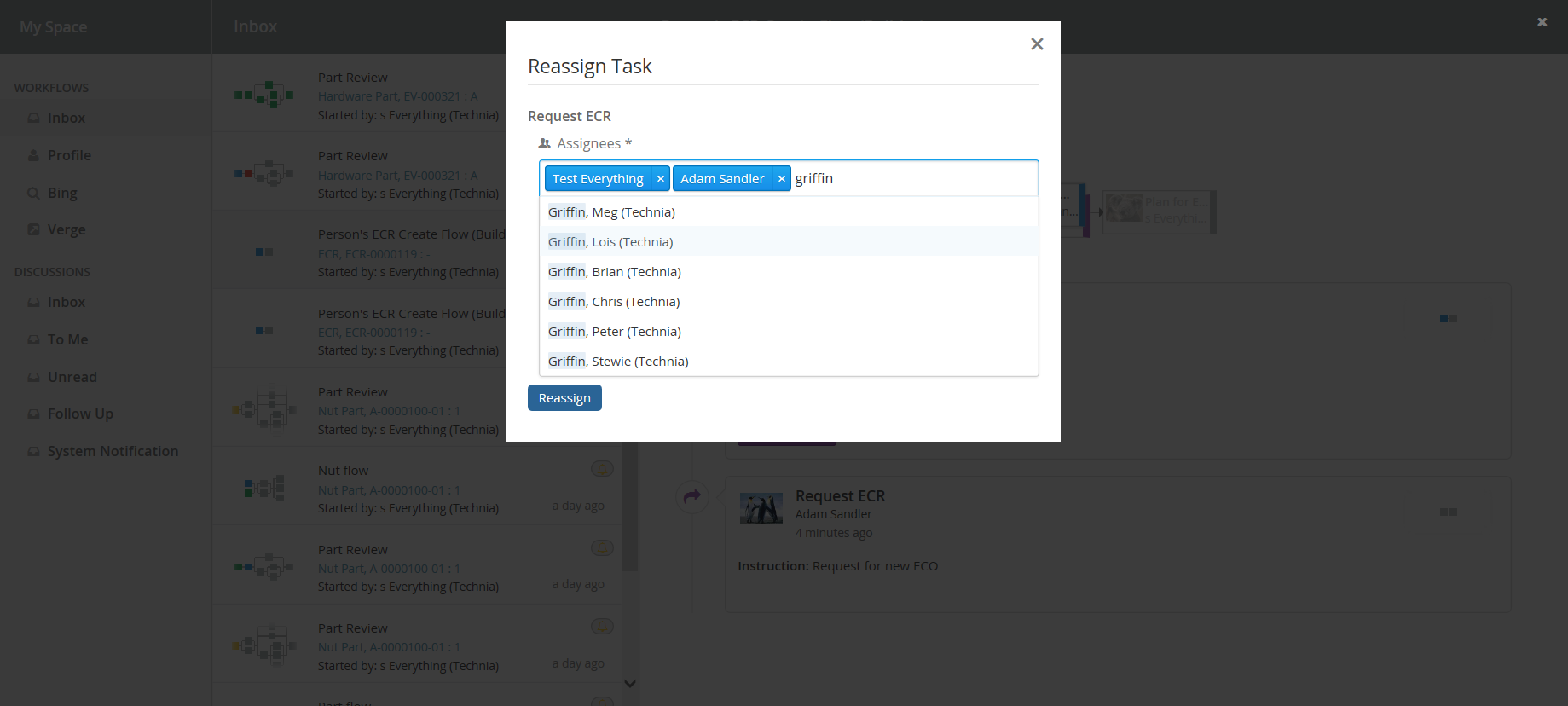
The task owner or one of the assignees can reassign the task to another user using the Reassign command located at the bottom of the task. The Reassign form will have an assignee field and optional custom fields if configured (e.g. comments)
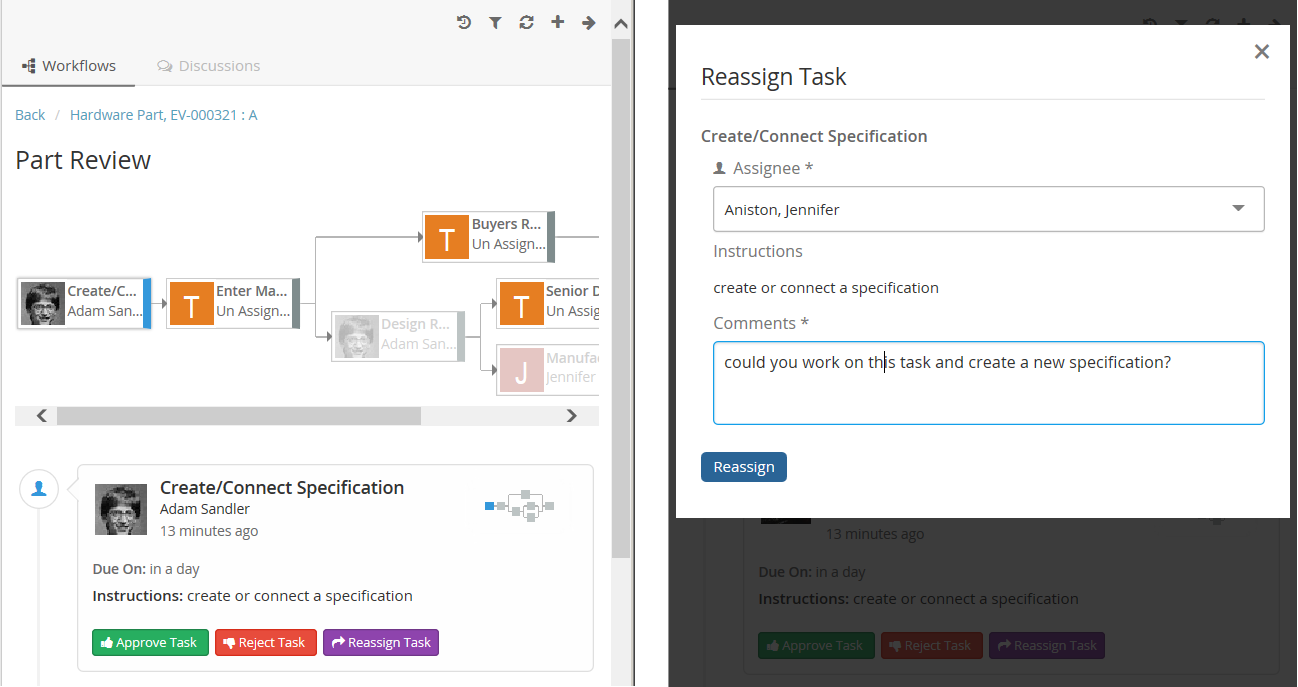
Figure 6. Reassigning a task
4.6. Approving a task
A task owner can approve the task when that task is active using Approve command located at the bottom of the task. The Approve form can have optional custom fields if configured (e.g. comments)
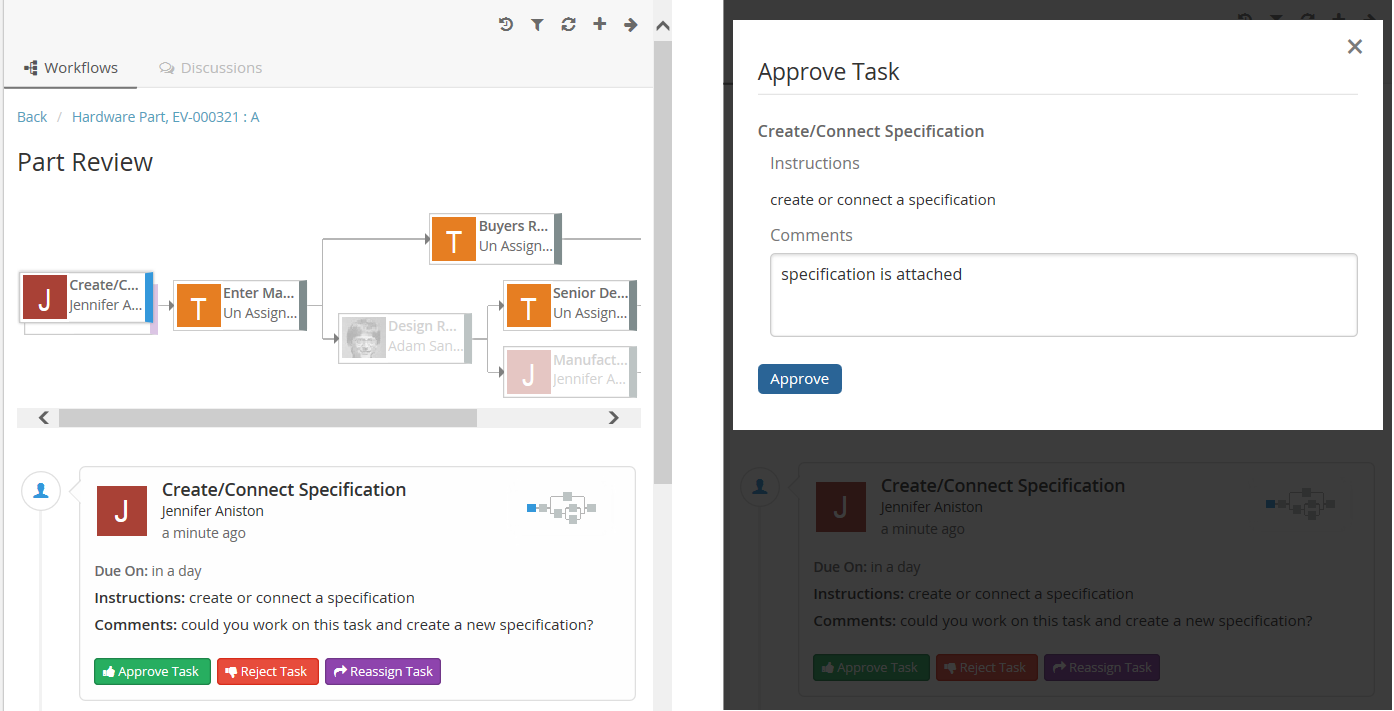
Figure 7. Approving a task
4.7. Assigning a task
A task assignee can assign the task to him/her-self using Assign command located at the bottom of the task.
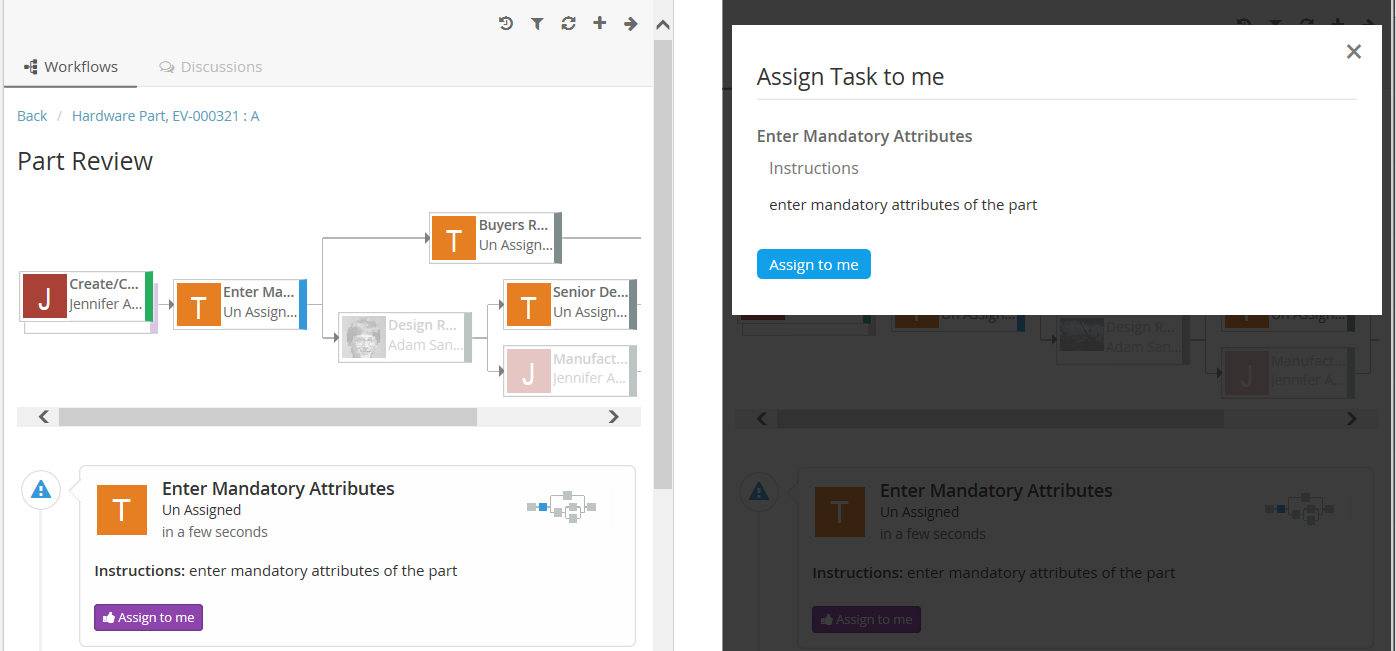
Figure 8. Assigning a task
4.8. Rejecting a task
A task owner can reject the task when that task is active using Reject command located at the bottom of the task. The Reject form can have optional custom fields if configured (e.g. comments)
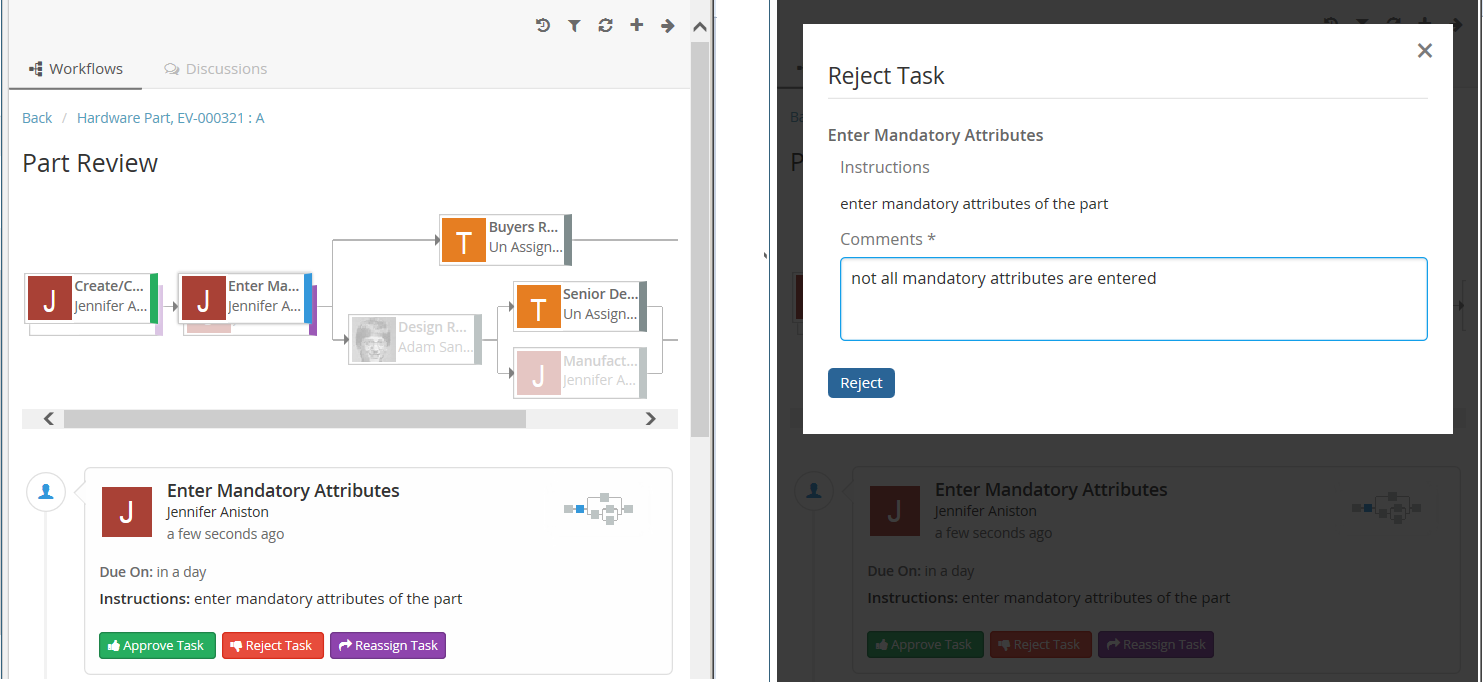
Figure 9. Rejecting a task
4.9. Configuration
The ability to have workflow around objects can be configured on the server.
This is done in a file called TVCWorkflowConfig.xml that is placed in
/WEB-INF/classes/TVCWorkflowConfig.xml. If you skip to have this
configuration file the users will not be able to have workflow around ANY object
in ENOVIA™ with default settings.
Below is an example configuration file that shows the supported elements and their location.
<WorkflowConfigs>
    <ConfiguredTypes>
        <Type derived="false" status="disabled">type_MechanicalPart</Type>
        <Type derived="false" status="disabled">type_SoftwarePart</Type>
        <Type derived="false" status="expand">type_HardwarePart</Type>
        <Type derived="false" status="enable" className="com.technia.tvc.collaboration.workflow.model.dao.enovia.config.builtin.WorkflowConfigType">type_NutPart</Type>
    </ConfiguredTypes>
    <WorkflowConfig for="Part" if="current=='Review'">
        <JsonConfig
			ref="tvc:workflowconfig:tvx:collaboration/PartReview.json" />
    </WorkflowConfig>
    <ObjectIdResolver/>
    <OrganizationResolver/>
    <ContextInfoResolver/>
    <WorkflowConfigProvider className="com.technia.tvc.collaboration.workflow.cfg.provider.impl.RouteWorkflowConfigProvider"/>
</WorkflowConfigs>
4.9.1. ConfiguredTypes
The <ConfiguredTypes> tag allows you to configure the workflow behavior or disable it for different types in the system. The child elements for this are <Type>
4.9.2. Type
This element allows you to control the discussion behavior for a specific type. The attribute "derived" will apply the setting for all derived types as well. The "status" attribute is used to "enable", "disable" or "expand" (enabled and automatically opened side panel)
4.9.3. WorkflowConfig
The <WorkflowConfig> element is used if you want to configure the workflow behavior for a type of object. You can have any amount of this element in your configuration.
4.9.4. JsonConfig
The <JsonConfig> element allows you to point out a json file that will have the configuration for workflow tasks. The complete path of the file to use is added to the attribute called "ref". That file path follows TVC path pattern.
4.9.5. ContextHandler
This element can be used to configure custom settings for the context information related to an object (used to display a link to the context object for a discussion/workflow). The child element <Macro> is used to configure the "display name" and the <URL> element is used to configure the URL to the context object.
4.9.6. ObjectIdResolver
This element is required only when custom parameters instead of objectId passed to load discussions. Allows you to point out a class that will have the logic for returning objectId from the parameters.
Default implementation resolves objectId based on type, name, revision
and vault values separated by &. (type=Part&name=10001&revision=1&vault=Production).
The complete name of the class to use is added to the attribute called
"className". That class has to implement the interface
com.technia.tvc.collaboration.core.model.dao.enovia.config.ObjectIdResolver.
4.9.7. OrganizationResolver
This element allows to return the Organization of the user, which can be used to show along with user name is Collaboration component. When there are multiple Organizations returned for the user, multiple entries will be shown in the autocomplete for the given user each for each organization.
Default implementation resolves Organizations based on Member relationship to Organization by "Organization Name" attribute value.
The complete name of the class to use is added to the attribute called
"className". That class has to implement the interface
com.technia.tvc.collaboration.core.model.dao.enovia.config.OrganizationResolver.
This element also supports an attribute called "select" which can be selectable to get Organization value.
<OrganizationResolver select="attribute[Organization Name]"/>.
From/Sender user organization is resolved using the implementation of OrganizationResolver’s getSenderOrganizations.
This property has to be enabled for Organization
tvc.collaboration.showOrganization=true.
Following properties can be used to tune autocomplete field.
| Property | Description | Default Value |
|---|---|---|
tvc.collaboration.showOrganization |
To enable Organizations inside collaboration component |
false |
tvc.collaboration.autocomplete.startWith |
Whether search criteria should match starting instead of contains |
false |
tvc.collaboration.autocomplete.minLength |
No. of characters after autocomplete initiated |
2 |
tvc.collaboration.autocomplete.loadThrottle |
No. of milliseconds after autocomplete initiated |
400 |
tvc.collaboration.autocomplete.caseSensitive |
Whether search criteria should be case sensitive |
false |
public class TestOrganizationResolver extends DefaultOrganizationResolver {

    @Override
    public List<Organization> getOrganizations(String user) throws TVCException {
        return super.getOrganizations(user);
    }

    @Override
    public List<Organization> getSenderOrganizations(OrganizationContext context) throws TVCException {
        //context contains Message, previously resolved Organizations, contextIds and Env
        return super.getSenderOrganizations(context);
    }
}
4.9.8. ContextInfoResolver
This element is similar to contextHandler but instead of to a single CollaborationConfig (i.e DiscussionConfig or WorkflowConfig) this is applicable to all CollaborationConfigs. This element can be used to configure custom settings for the context information related to an object (used to display a link to the context object for a discussion/workflow).
The child element <Macro> is used to configure the "display name" and
the <URL> element is used to configure the URL to the context object.
Default implementation resolves display name from <Macro> ${type},
${name} : ${revision}</Macro> and context URL from <URL>
/common/emxNavigator.jsp?objectId=${OBJECTID}</URL>.
The complete name of the class to use is added to the attribute called
"className". That class has to implement the interface
com.technia.tvc.collaboration.core.model.context.ContextInfoResolver.
Following properties can be used to configure the behavior of context path.
| Property | Description | Default Value |
|---|---|---|
tvc.collaboration.contextpath.popup |
Whether context path should be opened popup |
false |
tvc.collaboration.contextpath.popup.width |
Width of context path popup window in pixel |
900 |
tvc.collaboration.contextpath.popup.height |
Height of context path popup window in pixel |
700 |
4.9.9. WorkflowConfigProvider
More details at WorkflowConfigProvider.
5. Notifications
5.1. Receiving a notification
At some events that occur in the workflow functionality there are "notifications" sent out to users that are involved in a workflow/task in one or more ways. If someone starts a workflow/task around an object then the owner/assignees of that active task will get a notification. Users will also get notifications when another user rejected a task that user approved.
These notifications are sent to the user instantly when an event is occurring. We have two ways of notifying the users, one called "Inline notifications" and one called "Web notifications". These work in the same way but are displayed in different ways.
5.1.1. Inline notification (default)
Inline notifications are rendered in the top right corner of the browser window when an event occurs.
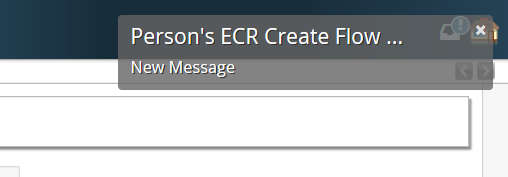 Inline notification
5.1.2. Web notification
Web notifications are displayed on the computer desktop, outside of the browser window. The benefit of this is that you will notice it even if your browser window is minimized. This is currently not supported in Internet Explorer and really old versions of the other browsers. Clicking the notification will show the browser window and open My Space.
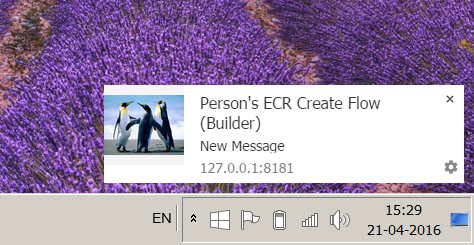 Web notification
6. My Space
When clicking on the icon in the global toolbar it will open something called "My Space" as a big overlay in the browser window. "My Space" contains a set of different functionality related to the user and the TVC Collaboration feature. Inbox and Profile are the default preconfigured "My Space" Actions. The functionality that is displayed on first load is called "Inbox" and is described in the next chapter. First load "My Space" Action can be rearranged TVCWorkflowConfig.xml.
6.1. Inbox
The inbox is a functionality used for displaying all notifications that a user has received. It has a layout that is similar to a mail application.
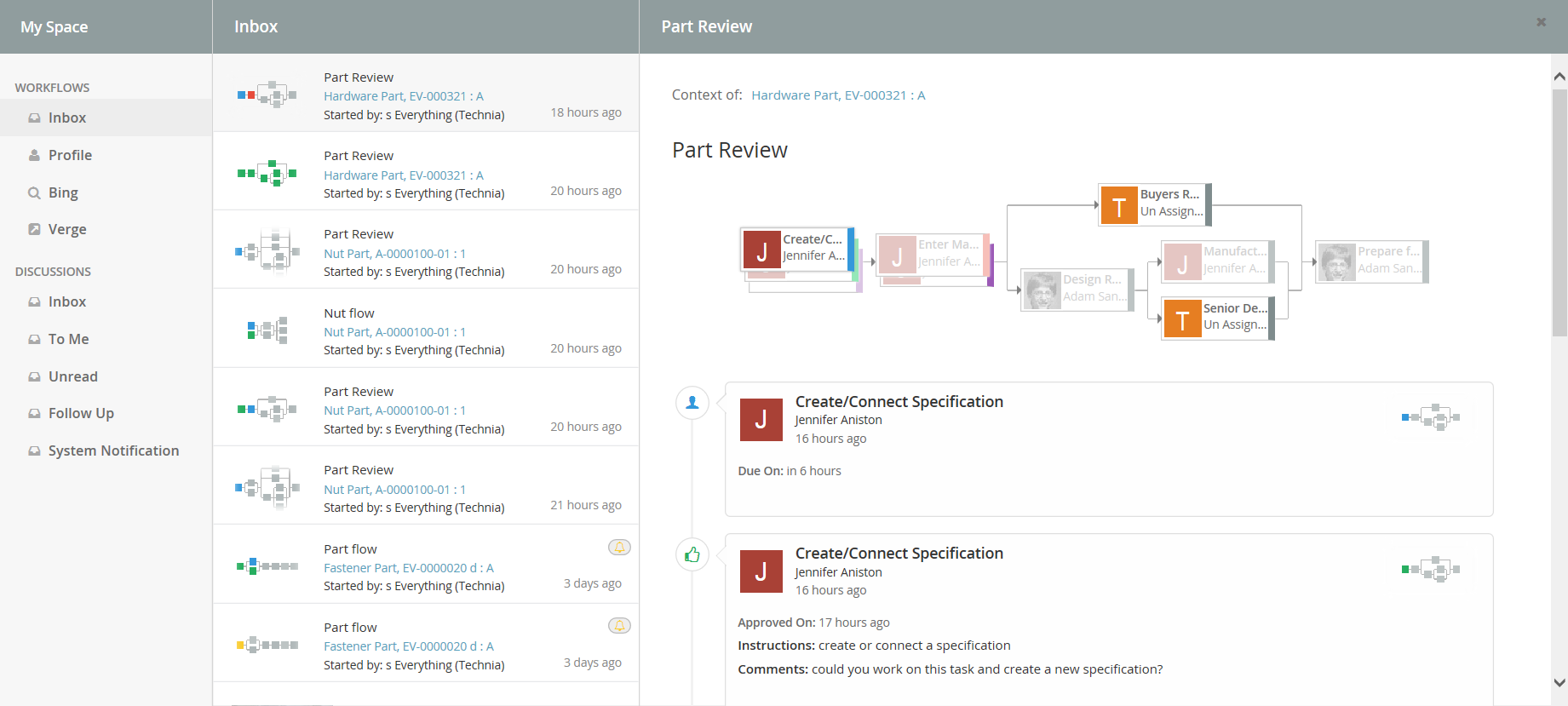
Figure: Inbox displaying notifications
6.1.1. Configuration
When MySpaceConfig is modified to include other "My Space" Actions. It is mandatory to include default Actions as well. Actions can be reordered. All Inbox derived actions can be repeated with different configuration but with unique action id. Actions can also be grouped under different labels.
<MySpaceConfig>
    <TabOrder>1</TabOrder>
    <!-- short form -->
    <!-- <WorkflowAction/> -->
    <!-- custom inbox with custom id -->
    <!-- <WorkflowAction id="some-unique-action-id"/> -->
    <WorkflowAction></WorkflowAction>
    <WorkflowAction>
        <Font>fa-inbox</Font>
        <Label>Inbox</Label>
        <Label locale="de">Posteingang</Label>
        <Label locale="sv">inkorg</Label>
        <Header>Inbox</Header>
        <Header locale="de">Posteingang</Header>
        <Header locale="sv">inkorg</Header>
    </WorkflowAction>
</MySpaceConfig>
6.2. Profile
The profile page has functionality for doing various types of actions related to the user. It is used for uploading an avatar image that will be displayed in discussions and for controlling user preferences.
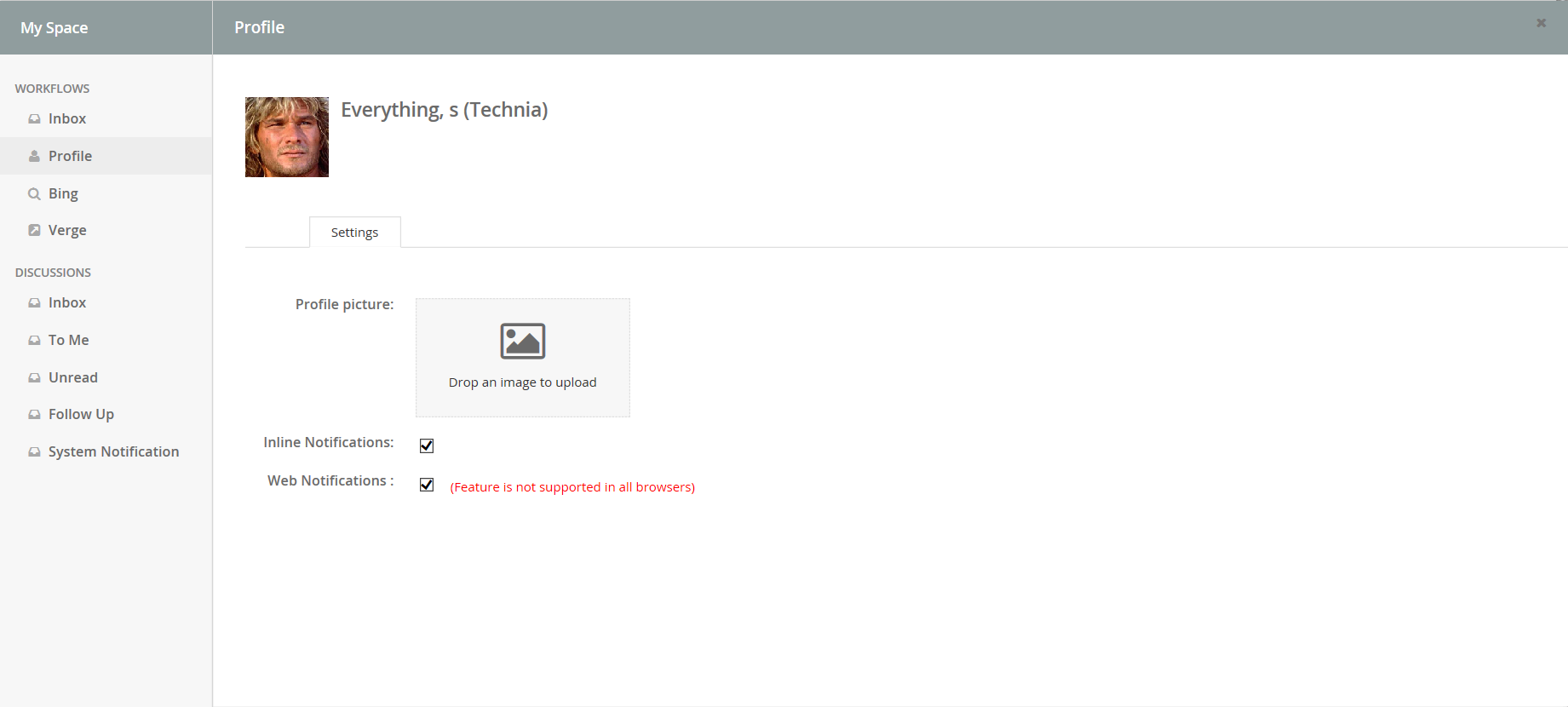
Figure: Profile Page
6.3. External
"ExternalAction" is a predefined custom Inbox Actions which can used in "My Space". This action can be used to host External web application inside iframe of Collaboration component.
Bing.com as MySpace Action:
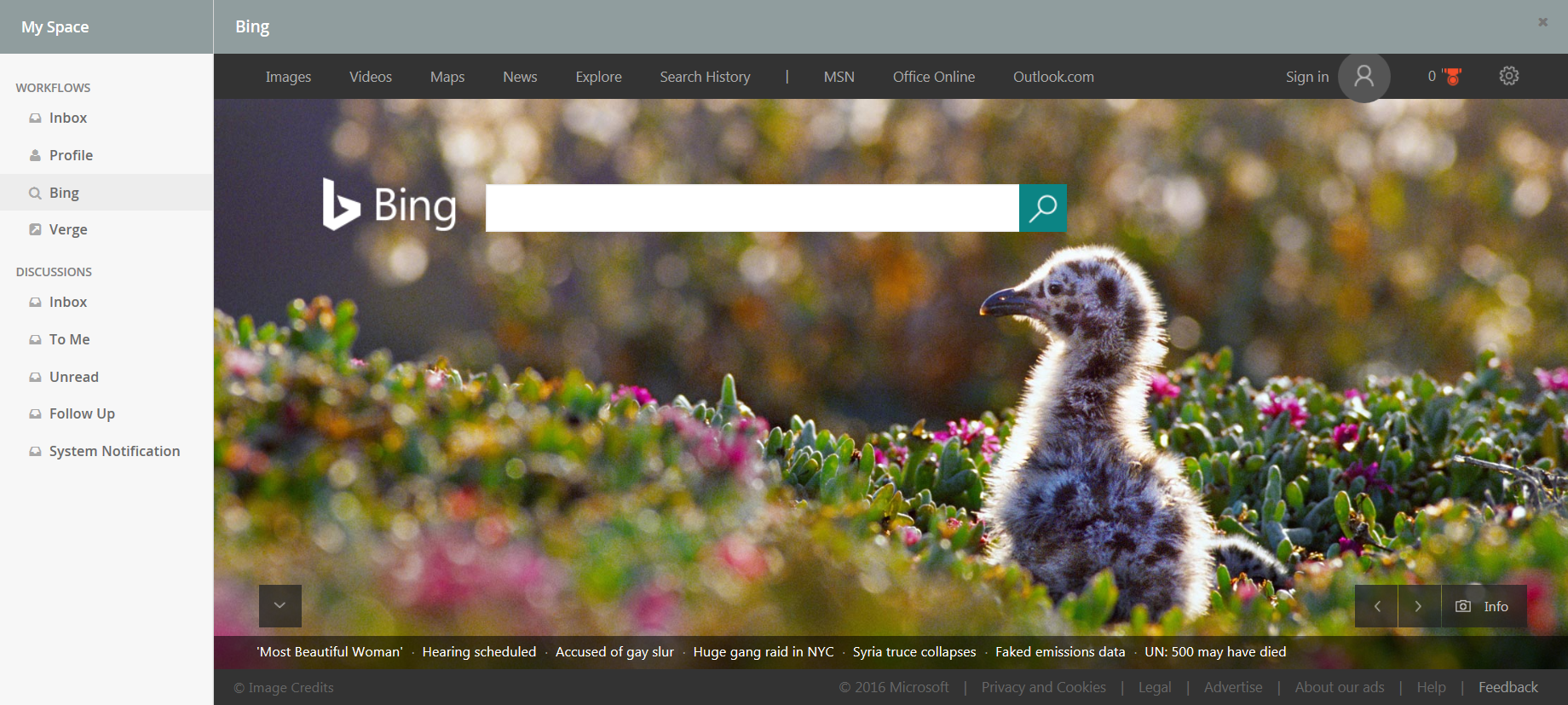
6.3.1. Configuration
<MySpaceConfig>
    <ExternalAction id="bing">
        <Label>Bing</Label>
        <Font>fa-search</Font>
        <Header>Bing</Header>
        <Href>http://bing.com</Href>
    </ExternalAction>
    <ExternalAction id="verge">
        <Label>Verge</Label>
        <Header>The Verge</Header>
        <Href>http://www.theverge.com/</Href>
    </ExternalAction>
</MySpaceConfig>
7. Structure Browser Integration
7.1. Link to Workflow
From a table page, you can add a column that will show an icon when a workflow exists for the object. Clicking on the icon brings up the workflow panel.
To enable this column in your table, add a column like shown below:
<Table>
    ...
    <Column>
        <Name>workflow-chart</Name>
        <ColumnType>workflow-chart</ColumnType>
    </Column>
</Table>
If the table is defined as a system table, use the setting "Column Type" to achieve the same.
Below a screenshot illustrating the clickable table miniature. It will appear when there is a related workflow.
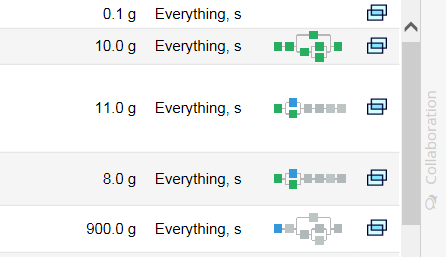
8. JSON Configuration
8.1. Type Definition
Note: Below configuration is not a valid JSON document. it represents the Workflow JSON configuration keys and it is associated types.
{
    "id": WorkflowId,
    "label": WorkflowLabel,
    "version": WorkflowVersion,

    "defaultDue": WorkflowDue,
    "defaultAccess": WorkflowAccess,
    "defaultField": WorkflowField,
    "defaultOperation": WorkflowOperation,
    "defaultAssignee": WorkflowAssignee,
    "defaultTrigger": WorkflowTrigger,
    "defaultTask": WorkflowTask,

    "dues": Array<WorkflowDue>,
    "accesses": Array<WorkflowAccesse>,
    "fields": Array<WorkflowField>,
    "operations": Array<WorkflowOperation>,
    "assignees": Array<WorkflowAssignee>,
    "triggers": Array<WorkflowTrigger>,
    "tasks": Array<WorkflowTask>,

    "watcher": WorkflowWatcher,
    "workflow": WorkFlowFlow
}
Following is a sample workflow configuration.
e.g.
{
    "id": "sample-builder",
    "label": "Sample Workflow",
    "version": 1,
    "defaultDue": {
        "id": "default",
        "days": 1,
        "activation": "task-activated"
    },
    "defaultAccess": null,
    "defaultField": {
        "id": "default",
        "label": "default",
        "multiline": false,
        "value": "",
        "handler": null,
        "values": null,
        "appearance": {
            "create": "readable",
            "reassign": "editable",
            "thread": "hidden",
            "approve": "readable",
            "complete": "readable",
            "reject": "readable",
            "assign": "readable"
        }
    },
    "defaultOperation": null,
    "defaultAssignee": null,
    "defaultTrigger": null,
    "defaultTask": {
        "id": "default",
        "label": null,
        "where": null,
        "multiple": true,
        "mandatory": true,
        "signature": false,
        "repeatable": null,
        "appearance": null,
        "due": null,
        "assignee": null,
        "fields": [
            "comments"
        ],
        "checks": null,
        "actions": null,
        "operations": [
            "approve",
            "reject",
            "assign"
        ]
    },
    "dues": [
        {
            "base": null,
            "id": "due-task-1",
            "days": 1,
            "activation": "workflow-started"
        }
    ],
    "accesses": [
        {
            "base": null,
            "id": "access-inverse",
            "access": "com.technia.tvc.collaboration.discussion.model.dao.enovia.example.access.CustomAccess",
            "config": {
                "inverse": true
            },
            "include": [
                "Jennifer Aniston",
                "Will Smith"
            ],
            "exclude": [
                "Test Everything",
                "Adam Sandler"
            ]
        }
    ],
    "fields": [
        {
            "base": null,
            "id": "field-mos",
            "label": "Meaning of signature",
            "multiline": null,
            "value": "this is Approval",
            "handler": null,
            "values": null,
            "appearance": null
        },
        {
            "base": null,
            "id": "field-custom-value",
            "label": "Custom Value",
            "multiline": null,
            "value": "sample custom value field",
            "handler": null,
            "values": null,
            "appearance": null
        },
        {
            "base": null,
            "id": "field-context-name",
            "label": "Context Object Name",
            "multiline": null,
            "value": null,
            "handler": "com.technia.tvc.collaboration.discussion.model.dao.enovia.example.fieldvaluehandler.NameFieldValueHandler",
            "values": null,
            "appearance": null
        }
    ],
    "operations": [
        {
            "base": null,
            "id": "operation-reassign-task",
            "where": null,
            "operation": "reassign",
            "config": {
                "key": "value"
            },
            "access": "access-inverse",
            "users": [
                "assignee",
                "owner",
                "participant"
            ],
            "statuses": [
                "Approved"
            ]
        }
    ],
    "assignees": [
        {
            "base": null,
            "id": "assignee-task-1",
            "type": "role",
            "value": "Software Quality Engineer",
            "handler": null,
            "autocomplete": "role",
            "values": null,
            "appearance": {
                "create": "readable"
            }
        },
        {
            "base": null,
            "id": "assignee-task-2.1",
            "type": "com.technia.tvc.collaboration.discussion.model.dao.enovia.example.assignee.CustomAssignee",
            "value": null,
            "handler": {
                "name": "com.technia.tvc.collaboration.discussion.model.dao.enovia.example.assignee.CustomAssigneeHandler",
                "config": null
            },
            "autocomplete": "com.technia.tvc.collaboration.discussion.model.dao.enovia.example.assignee.CustomAssigneeAutocompleteHandler",
            "values": null,
            "appearance": null
        },
        {
            "base": null,
            "id": "assignee-task-2.2",
            "type": "person",
            "value": null,
            "config": null,
            "handler": null,
            "autocomplete": {
                "handler": "person",
                "config": {
                    "roles": [
                        "Design Engineer",
                        "role_LibraryUser",
                        "role_Employee"
                    ]
                }
            },
            "values": null,
            "appearance": null
        },
        {
            "base": null,
            "id": "assignee-task-3",
            "type": "user",
            "value": null,
            "config": null,
            "handler": null,
            "autocomplete": "user",
            "values": [
                "Adam Sandler",
                "Software Quality Engineering",
                "Will Smith"
            ],
            "appearance": null
        }
    ],
    "triggers": [
        {
            "base": null,
            "id": "action-flow-complete",
            "where": null,
            "events": [
                "Approved"
            ],
            "trigger": "flowstatus",
            "config": {
                "status": "complete"
            }
        },
        {
            "base": null,
            "id": "action-any-rejected",
            "where": null,
            "events": [
                "Rejected"
            ],
            "trigger": "demote",
            "config": {
                "previleged": false
            }
        },
        {
            "base": null,
            "id": "action-custom-history",
            "where": null,
            "events": [
                "Approved"
            ],
            "trigger": "history",
            "config": {
                "value": "custom history info",
                "previleged": false
            }
        },
        {
            "base": null,
            "id": "action-flow-approved",
            "where": null,
            "events": [
                "Approved"
            ],
            "trigger": "sequence",
            "config": {
                "triggers": [
                    "action-flow-complete",
                    "action-custom-history"
                ]
            }
        }
    ],
    "tasks": [
        {
            "base": null,
            "id": "task-1",
            "label": "Task 1 (role)",
            "where": null,
            "contentURL": null,
            "multiple": null,
            "mandatory": null,
            "signature": null,
            "repeatable": true,
            "appearance": "readable",
            "due": "due-task-1",
            "assignee": "assignee-task-1",
            "fields": [
                "comments",
                "instructions"
            ],
            "checks": null,
            "actions": [
                "history"
            ],
            "operations": [
                "complete",
                "reassign",
                "assign"
            ]
        },
        {
            "base": null,
            "id": "task-2.1",
            "label": "Task 2.1 (custom)",
            "where": null,
            "contentURL": null,
            "multiple": null,
            "mandatory": null,
            "signature": null,
            "repeatable": null,
            "appearance": null,
            "due": null,
            "assignee": "assignee-task-2.1",
            "fields": [
                "instructions"
            ],
            "checks": null,
            "actions": [
                "history"
            ],
            "operations": [
                "complete",
                "reassign",
                "assign"
            ]
        },
        {
            "base": null,
            "id": "task-2.2",
            "label": "Task 2.2 (person-in-role)",
            "where": null,
            "contentURL": null,
            "multiple": null,
            "mandatory": null,
            "signature": true,
            "repeatable": null,
            "appearance": null,
            "due": null,
            "assignee": "assignee-task-2.2",
            "fields": [
                "comments",
                "field-mos",
                "field-context-name",
                "field-custom-value",
                "instructions"
            ],
            "checks": null,
            "actions": [
                "history"
            ],
            "operations": [
                "complete",
                "reassign",
                "assign"
            ]
        },
        {
            "base": null,
            "id": "task-3",
            "label": "Task 3 (user)",
            "where": null,
            "contentURL": null,
            "multiple": true,
            "mandatory": null,
            "signature": true,
            "repeatable": true,
            "appearance": null,
            "due": null,
            "assignee": "assignee-task-3",
            "fields": [
                "comments"
            ],
            "checks": null,
            "actions": [
                "history"
            ],
            "operations": [
                "complete",
                "assign"
            ]
        }
    ],
    "watcher": {
        "id": "watcher-flow",
        "type": "person",
        "value": null,
        "config": null,
        "handler": {
            "name": "com.technia.tvc.collaboration.discussion.model.dao.enovia.example.watcher.EverythingWatcher",
            "config": {
                "key": "value"
            }
        },
        "values": [
            "Adam Sandler",
            "Jennifer Aniston"
        ]
    },
    "workflow": [
        [
            "task-1",
            [
                "task-2.1",
                "task-2.2"
            ],
            "task-3"
        ]
    ]
}
8.2. WorkflowId
Type: String
unique id for the workflow configuration.
e.g.
{
    "id": "global-sample-builder",

    ...
}
8.3. WorkflowLabel
Type: String
label for the workflow configuration.
e.g.
{
    ...

    "label": "Global Sample Workflow",

    ...
}
8.4. WorkflowVersion
Type: Number
version for the workflow configuration.
e.g.
{
    ...

    "version": 0.1,

    ...
}
8.5. WorkflowDue
Type: DueCfg
Schema
{
    "base": DueBase,
    "id": DueId,
    "days": DueDays,
    "activation":  DueActivation
}
Represents a Due, that can be referred by Tasks.
e.g.
{
    ...

    "defaultDue": {
        "base": null,
        "id": "default",
        "days": 1,
        "activation": "task-activated"
    },

    ...
}8.6. WorkflowAccess
Type: AccessCfg
Schema
{
    "base": AccessBase,
    "id": AccessId,
    "access":  AccessHandler,
    "config": AccessConfig,
    "include": AccessIncludeAssignees,
    "exclude": AccessExcludeAssignees
}
Represents a Access, that can be referred by Tasks.
e.g.
{
    ...

    "accesses": [
        {
            "base": null,
            "id": "access-inverse",
            "access": "com.technia.tvc.collaboration.discussion.model.dao.enovia.example.access.CustomAccess",
            "config": {
                "inverse": true
            },
            "include": [
                "Jennifer Aniston",
                "Will Smith"
            ],
            "exclude": [
                "Test Everything",
                "Adam Sandler"
            ]
        }
    ],

    ...
}
8.6.1. AccessBase
Type: String
refers a existing configured AccessCfg’s AccessId. This inherits configurations from the base, that can be overriden locally.
e.g.
{
    "base": "access-user",
    "id": "access-super-user"

    ...
}8.6.3. AccessHandler
Type: String
refers a class’s full name which implements com.technia.tvc.collaboration.workflow.model.access.Access.
e.g.
{
    ...

    "access": "com.technia.tvc.collaboration.discussion.model.dao.enovia.example.access.CustomAccess",

    ...
}
8.6.4. AccessConfig
Type: Map<Object,Object>
any custom configuration values.
e.g.
{
    ...

    "config": {
        "inverse": true
    }

    ...
}8.7. WorkflowField
Type: FieldCfg
Schema
{
    "base": FieldBase,
    "id": FieldId,
    "label": FieldLabel,
    "multiline": FieldMultiline,
    "value": FieldValue,
    "handler": FieldHandler,
    "values": Array<FieldValue>,
    "appearance": FieldAppearance
}
Represents a Field, that can be referred by Tasks.
There are two built-in fields that are,
-
"instructions"
-
"comments"
e.g.
{
    ...

    "fields": [
        {
            "base": null,
            "id": "field-context-name",
            "label": "Context Object Name",
            "multiline": false,
            "value": "<context object name>",
            "handler": "com.technia.tvc.collaboration.discussion.model.dao.enovia.example.fieldvaluehandler.NameFieldValueHandler",
            "values": null,
            "appearance": {
                "create": "readable",
                "reassign": "editable",
                "thread": "hidden",
                "approve": "readable",
                "complete": "readable",
                "reject": "readable",
                "assign": "readable"
            }
        }
    ],

    ...
}
8.7.1. FieldBase
Type: String
refers a existing configured FieldCfg’s FieldId. This inherits configurations from the base, that can be overriden locally.
e.g.
{
    "base": "field-common",
    "id": "field-steps"

    ...
}8.7.3. FieldLabel
Type: String
The label that will be displyed on the Workflow Forms for the field.
e.g.
{
    ...

    "label": "Context Object Name",

    ...
}
8.7.4. FieldMultiline
Type: Boolean
Whether to show multiline input control for the field.
e.g.
{
    ...

    "multiline": true,

    ...
}
8.7.5. FieldValue
Type: FieldValue
Schema
{
    "value": String,
    "display": String,
    "selected": Boolean
}
Represents a field value.
e.g.
{
    ...

    "values" : [
        {
            "value": "actual value",
            "display": "display value",
            "selected": true
        }
    ]

    ...
}
8.7.6. FieldHandler
Type: String
refers a class’s full name which implements com.technia.tvc.collaboration.workflow.model.dao.enovia.config.FieldHandler.
FieldHandler is used to return multiple values.
e.g.
{
    ...

    "handler": "com.technia.tvc.collaboration.discussion.model.dao.enovia.example.fieldvaluehandler.NameFieldValueHandler",

    ...
}
8.7.7. FieldAppearance
Type: Map<Component, Appearance>
Component
Type: Component
fixed value. options are,
-
"create"
-
"reassign"
-
"thread"
-
"approve"
-
"complete"
-
"reject"
-
"assign"
Appearance
Type: Appearance
fixed value. options are,
-
"readable"
-
"hidden"
-
"mandatory"
-
"editable"
-
"text"
-
"visible"
Represents a component and appearance mapping.
e.g.
{
    ...

    "appearance": {
        "create": "readable",
        "reassign": "editable",
        "thread": "hidden",
        "approve": "readable",
        "complete": "readable",
        "reject": "readable",
        "assign": "readable"
    }

    ...
}
8.8. WorkflowOperation
Type: OperationCfg
Schema
{
    "base": OperationBase,
    "id": OperationId,
    "where": OperationWhere,
    "operation": OperationHandler,
    "config": OperationConfig,
    "access": OperationAccess,
    "users": OperationUser,
    "statuses": OperationStatuses
}
Represents a Operation, that can be referred by Tasks.
There are following built-in operations that are,
-
"complete"
-
"approve"
-
"reject"
-
"assign"
-
"reassign"
-
"remind"
-
"reopen"
e.g.
{
    ...

    "operations": [
        {
            "base": null,
            "id": "operation-reassign-task",
            "where": null,
            "operation": "reassign",
            "config": {
                "key": "value"
            },
            "access": "access-inverse",
            "users": [
                "assignee",
                "owner",
                "participant"
            ],
            "statuses": [
                "Approved"
            ]
        }
    ],

    ...
}
8.8.1. OperationBase
Type: String
refers a existing configured OperationCfg’s OperationId. This inherits configurations from the base, that can be overriden locally.
e.g.
{
    "base": "operation-common",
    "id": "operation-reassign-task"

    ...
}
8.8.2. OperationId
Type: String
unique id of the operation.
e.g.
{
    "id": "operation-reassign-task",

    ...
}
8.8.3. OperationWhere
Type: String
Whether the operation can be executed.
e.g.
{
    ...

    "where": "(context.user == 'Test Everything')",

    ...
}
8.8.4. OperationHandler
Type: String
refers a class’s full name which implements com.technia.tvc.collaboration.workflow.model.operation.Operation.
e.g.
{
    ...

    "operation": "com.technia.tvc.collaboration.discussion.model.dao.enovia.example.operation.CustomOperation",

    ...
}
8.8.5. OperationConfig
Type: Map<Object,Object>
any custom configuration values.
e.g.
{
    ...

    "config": {
        "inverse": true
    }

    ...
}
8.8.6. OperationAccess
Type: String
refers a existing configured AccessCfg’s AccessId. This inherits configurations from the base, that can be overriden locally.
e.g.
{
    ...

    "access": "access-librarian"

    ...
}8.9. WorkflowAssignee
Type: AssigneeCfg
Schema
{
	"base": AssigneeBase,
	"id": AssigneeId,
	"type": AssigneeType,
	"config": AssigneeConfig,
	"handler": AssigneeHandlerCfg,
	"autocomplete": AssigneeAutocompleteCfg,
	"value": AssigneeValue,
	"values": Array<AssigneeValue>,
	"appearance": AssigneeAppearance
}
Represents a Assignee, that can be referred by Tasks.
e.g.
{
    ...

    "assignees": [
        {
            "base": null,
            "id": "assignee-person-within-role",
            "type": "person",
            "value": null,
            "handler": null,
            "autocomplete": {
                "handler": "person",
                "config": {
                    "roles": [
                        "Design Engineer",
                        "role_LibraryUser",
                        "role_Employee"
                    ]
                }
            },
            "values": null,
            "appearance": null
        },
         {
            "base": null,
            "id": "assignee-custom",
            "type": "com.technia.tvc.collaboration.discussion.model.dao.enovia.example.assignee.CustomAssignee",
            "value": null,
            "handler": "com.technia.tvc.collaboration.discussion.model.dao.enovia.example.assignee.CustomAssigneeHandler",
            "autocomplete": "com.technia.tvc.collaboration.discussion.model.dao.enovia.example.assignee.CustomAssigneeAutocompleteHandler",
            "values": null,
            "appearance": null
        }
    ],

    ...
}
8.9.1. AssigneeBase
Type: String
refers a existing configured AssigneeCfg’s AssigneeId. This inherits configurations from the base, that can be overriden locally.
e.g.
{
    "base": "assignee-task-common",
    "id": "assignee-task-review"

    ...
}
8.9.2. AssigneeId
Type: String
unique id of the assignee.
e.g.
{
    "id": "assignee-task-release",

    ...
}
8.9.3. AssigneeType
Type: AssigneeType
fixed or custom value. options are,
-
"person"
-
"role"
-
"group"
-
"user"
or any class implementing "com.technia.tvc.collaboration.core.model.Assignee"
e.g.
{
    ...

    "assignees" : [
        {
            ...

            "type": "role",

            ...
        },
        {
            ...

            "type": "com.technia.tvc.collaboration.discussion.model.dao.enovia.example.assignee.CustomAssignee",

            ...
        }
    ]

    ...
}
8.9.4. AssigneeValue
Type: String
Assignee name that can match the Assignee-Type configured.
e.g.
{
    ...

    "assignees" : [
        {
            ...

            "type": "user",
            "values": [
                "Adam Sandler",
                "Software Quality Engineering",
                "Will Smith"
            ],

            ...
        }
    ]

    ...
}
8.9.5. AssigneeHandlerCfg
Type: AssigneeHandler | AssigneeHandlerCfg
Type: AssigneeHandlerCfg
Schema
{
	"name": AssigneeHandler,
	"config": AssigneeHandlerConfig
}
Represents a AssigneeHandler, that is used in Assignee.
e.g.
{
    ...

    "assignees": [
        {
            ...

            "handler": "com.technia.tvc.collaboration.discussion.model.dao.enovia.example.assignee.CustomAssigneeHandler",

            ...
        },
         {
            ...

            "handler": {
                "name": "com.technia.tvc.collaboration.discussion.model.dao.enovia.example.assignee.CustomAssigneeHandler",
                "config": {
                    "key": "value"
                }
            }

            ...
        }
    ],

    ...
}
AssigneeHandler
Type: String
refers a class’s full name which implements com.technia.tvc.collaboration.workflow.model.dao.enovia.config.AssigneeHandler.
e.g.
{
    ...

    "assignees": [
        {
            ...

            "handler": "com.technia.tvc.collaboration.discussion.model.dao.enovia.example.assignee.CustomAssigneeHandler",

            ...
        },
         {
            ...

            "handler": {
                "name": "com.technia.tvc.collaboration.discussion.model.dao.enovia.example.assignee.CustomAssigneeHandler",
            }

            ...
        }
    ],

    ...
}
AssigneeHandlerConfig
Type: Map<Object,Object>
any custom configuration values. This configuration will be available for AssigneeHandler.
e.g.
{
    ...

    "assignees": [
        {
            ...

            "handler": {
                "name": "com.technia.tvc.collaboration.discussion.model.dao.enovia.example.assignee.CustomAssigneeHandler",
                "config": {
                    "key": "value"
                }
            }

            ...
        }
    ],

    ...
}
8.9.6. AssigneeAutocompleteCfg
Type: String | AssigneeAutocompleteCfg
fixed or custom complex value. options are,
-
"person"
-
"role"
-
"group"
-
"user"
Schema
{
	"handler": AssigneeAutocompleteHandler,
	"config": AssigneeAutocompleteConfig
}
AssigneeAutocompleteHandler
Type: String
refers a class’s full name which implements com.technia.tvc.collaboration.workflow.model.operation.Operation.
e.g.
{
    ...

    "assignees": [
        {
            ...

            "autocomplete":  "com.technia.tvc.collaboration.discussion.model.dao.enovia.example.assignee.CustomAssigneeAutocompleteHandler"

            ...
        },
        {
            ...

            "autocomplete": {
                "handler": "com.technia.tvc.collaboration.discussion.model.dao.enovia.example.assignee.CustomAssigneeAutocompleteHandler",
                "config": {
                    "key": "value"
                }
            }

            ...
        },
    ],

    ...
}
AssigneeAutocompleteConfig
Type: Map<Object,Object>
any custom configuration values. This configuration will be available for AssigneeAutocompleteHandler.
e.g.
{
    ...

    "config": {
        "key": "value"
    }

    ...
}
8.9.7. AssigneeAppearance
Type: Map<Component, Appearance>
Component
Type: Component
fixed value. options are,
-
"create"
-
"reassign"
-
"thread"
-
"approve"
-
"complete"
-
"reject"
-
"assign"
Appearance
Type: Appearance
fixed value. options are,
-
"readable"
-
"hidden"
-
"mandatory"
-
"editable"
-
"text"
-
"visible"
Represents a component and appearance mapping.
e.g.
{
    ...

    "appearance": {
        "create": "readable",
        "reassign": "editable",
        "thread": "hidden",
        "approve": "readable",
        "complete": "readable",
        "reject": "readable",
        "assign": "readable"
    }

    ...
}
8.10. WorkflowTrigger
Type: TriggerCfg
Schema
{
    "base": TriggerBase,
    "id": TriggerId,
    "where": TriggerWhere,
    "events": TriggerEvents,
    "trigger": Trigger,
    "config": TriggerConfig
}
Represents a Trigger, that can be referred by Tasks.
There are following built-in triggers that are,
-
"promote"
-
"demote"
-
"history"
-
"setstate"
-
"jpo"
-
"flowstatus"
-
"sequence"
e.g.
{
    ...

    "triggers": [
        {
            "base": null,
            "id": "action-custom-history",
            "where": null,
            "events": [
                "Approved",
                "Complete",
                "Rejected"
            ],
            "trigger": "history",
            "config": {
                "value": "custom history info",
                "previleged": true
            }
        }

        ...
    ],

    ...
}
8.10.1. TriggerBase
Type: String
refers a existing configured TriggerCfg’s TriggerId. This inherits configurations from the base, that can be overriden locally.
e.g.
{
    "base": "trigger-promote",
    "id": "trigger-selective-promote"

    ...
}8.10.3. TriggerWhere
Type: String
Whether the trigger can be executed.
e.g.
{
    ...

    "where": "(context.user == 'Test Everything')",

    ...
}
8.10.4. TriggerHandler
Type: String
refers a class’s full name which implements com.technia.tvc.collaboration.workflow.model.trigger.Trigger.
e.g.
{
    ...

    "trigger": "com.technia.tvc.collaboration.workflow.cfg.trigger.impl.builtin.ExampleTrigger",

    ...
}
8.10.5. TriggerConfig
Type: Map<Object,Object>
any custom configuration values.
e.g.
{
    ...

    {
        ...

        "trigger": "flowstatus",
        "config": {
            "status": "complete"
        }

        ...

    },
    {
        ...

        "trigger": "jpo",
        "config": {
            "program": "emxCustomProgram",
            "method": "logEvent"
        }

        ...

    },
    {
        ...

        "trigger": "setstate",
        "config": {
            "state": "Review",
            "previleged": true
        }

        ...

    }

    ...
}8.11. WorkflowTask
Type: TaskCfg
Schema
{
	"base": TaskBase,
	"id": TaskId,
	"label": TaskLabel,
	"where": TaskWhere,
	"multiple": TaskMultiple,
	"mandatory": TaskMandatory,
	"signature": TaskSignature,
	"repeatable": TaskRepeatable,
	"appearance": TaskAppearance,
	"due": TaskDue,
	"assignee": TaskAssignee,
	"fields": Array<TaskField>,
	"checks": Array<TaskTrigger>,
	"actions": Array<TaskTrigger>,
	"operations": Array<TaskOperation>
}
Represents a Task, that can be referred by Workflow.
e.g.
{
    ...

    "tasks": [
        {
            "base": null,
            "id": "task-review",
            "label": "Part Review",
            "where": null,
            "multiple": true,
            "mandatory": null,
            "signature": true,
            "repeatable": false,
            "appearance": null,
            "due": null,
            "assignee": "assignee-task-review",
            "fields": [
                "comments"
                "field-context-name",
                "instructions"
            ],
            "checks": null,
            "actions": [
                "history",
                "action-super-promote",
            ],
            "operations": [
                "reassign",
                "assign",
                "operation-review"
            ]
        }

        ...
    ],

    ...
}
8.11.1. TaskBase
Type: String
refers a existing configured TaskCfg’s TaskId. This inherits configurations from the base, that can be overriden locally.
e.g.
{
    "base": "task-review",
    "id": "task-manager-review"

    ...
}8.11.4. TaskWhere
Type: String
Whether the task can be included.
e.g.
{
    ...

    "where": "(context.user == 'Test Everything')",

    ...
}
8.11.5. TaskMultiple
Type: Boolean
Whether to allow selection of multiple assignee for the task.
e.g.
{
    ...

    "multiple": true,

    ...
}
8.11.6. TaskMandatory
Type: Boolean
Whether selection of assignee for the task is mandatory.
e.g.
{
    ...

    "mandatory": true,

    ...
}
8.11.7. TaskSignature
Type: Boolean
Whether the task approval or rejection requires re-entry of user credential.
e.g.
{
    ...

    "signature": true,

    ...
}
8.11.8. TaskRepeatable
Type: Boolean
Whether the task will be repeated if multiple assignees selected or the assignee types resolves to multiple users.
e.g.
{
    ...

    "repeatable": true,

    ...
}
8.11.9. TaskAppearance
Type: Map<Component, Appearance>
Component
Type: Component
fixed value. options are,
-
"create"
-
"reassign"
-
"thread"
-
"approve"
-
"complete"
-
"reject"
-
"assign"
Appearance
Type: Appearance
fixed value. options are,
-
"readable"
-
"hidden"
-
"mandatory"
-
"editable"
-
"text"
-
"visible"
Represents a component and appearance mapping.
e.g.
{
    ...

    "appearance": {
        "create": "readable",
        "reassign": "editable",
        "thread": "hidden",
        "approve": "readable",
        "complete": "readable",
        "reject": "readable",
        "assign": "readable"
    }

    ...
}
8.11.10. TaskDue
Type: String | DueCfg
e.g.
{
    ...

    "tasks": [
        {
            ...

            "due": "due-urgent"

            ...
        },
        {
            ...

            "due": {
                "days": 1,
                "activation": "task-activated"
            }

            ...
        }
    ]

    ...
}
8.11.11. TaskAssignee
Type: String | AssigneeCfg
refers a AssigneeId (recommended as it enables reuse) or inline AssigneeCfg.
e.g.
{
    ...

    "tasks": [
        {
            ...

            "assignee": "assignee-person-within-role"

            ...
        },
        {
            ...

            "assignee": {
                "type": "person",
                "autocomplete": {
                    "handler": "person",
                    "config": {
                        "roles": [
                            "Design Engineer",
                            "role_LibraryUser",
                            "role_Employee"
                        ]
                    }
                }
            }

            ...
        }
    ]

    ...
}
8.11.12. TaskField
Type: String | FieldCfg
e.g.
{
    ...

    "tasks": [
        {
            ...

            "fields": [
                "instruction",
                "field-context-name",
                {
                    "label": "Meaning of signature",
                    "multiline": false,
                    "value": "This is Approval",
                    "appearance": {
                        "create": "readable",
                        "reassign": "editable"
                    }
                }
            ]

            ...
        }
    ]

    ...
}
8.11.13. TaskTrigger
Type: String | TriggerCfg
refers a TriggerId (recommended as it enables reuse) or inline TriggerCfg.
e.g.
{
    ...

    "tasks": [
        {
            ...

            "checks": [
                "check-valid-state"
            ],
            "actions": [
                "action-promote-connected",
                {
                    "events": [
                        "Approved",
                        "Complete",
                        "Rejected"
                    ],
                    "trigger": "history",
                    "config": {
                        "previleged": true
                    }
                }
            ]

            ...
        }
    ]

    ...
}
8.11.14. TaskOperation
Type: String | OperationCfg
refers a OperationId (recommended as it enables reuse) or inline OperationCfg.
e.g.
{
    ...

    "tasks": [
        {
            ...

            "operations": [
                "complete",
                "reassign",
                "assign",
                {
                    "operation": "reassign",
                    "access": "access-inverse",
                    "users": [
                        "assignee",
                        "owner",
                        "participant"
                    ],
                    "statuses": [
                        "Approved"
                    ]
                }
            ]

            ...
        }
    ]

    ...
}
8.12. WorkfloWatcher
Type: WatcherCfg
Schema
{
    "type": WatcherType,
    "value": WatcherValue,
    "values": Array<WatcherValue>,
    "handler":  WatcherHandlerCfg
}
Represents a Watcher configuration, which can result into multiple watchers who watch the workflow.
e.g.
{
    ...

    "watcher": {
        "type": "person",
        "value": null,
        "values": [
            "Adam Sandler",
            "Jennifer Aniston"
        ],
        "handler": {
            "name": "com.technia.tvc.collaboration.discussion.model.dao.enovia.example.watcher.EverythingWatcher",
            "config": {
                "key": "value"
            },
        }
    }

    ...
}
8.12.1. WatcherType
Type: AssigneeType
fixed or custom value. options are,
-
"person"
-
"role"
-
"group"
-
"user"
or any class implementing "com.technia.tvc.collaboration.core.model.Assignee"
e.g.
{
    ...

    "assignees" : [
        {
            ...

            "type": "role",

            ...
        },
        {
            ...

            "type": "com.technia.tvc.collaboration.discussion.model.dao.enovia.example.assignee.CustomAssignee",

            ...
        }
    ]

    ...
}
8.12.2. WatcherValue
Type: String
Watcher name that can match the WatcherType configured.
e.g.
{
    ...

    "watcher" : {
            ...

            "type": "user",
            "values": [
                "Adam Sandler",
                "Software Quality Engineering",
                "Will Smith"
            ],

            ...
        }

    ...
}
8.12.3. WatcherHandlerCfg
Type: WatcherHandler | WatcherHandlerCfg
Type: WatcherHandlerCfg
Schema
{
    "name": WatcherHandler,
    "config": WatcherHandlerConfig
}
Represents a WatcherHandler, that is used in Watcher.
e.g.
{
    ...

    "handler": "com.technia.tvc.collaboration.discussion.model.dao.enovia.example.watcher.EverythingWatcher",

    ...
}

or

{
    ...

   "handler": {
        "name": "com.technia.tvc.collaboration.discussion.model.dao.enovia.example.watcher.EverythingWatcher",
        "config": {
            "key": "value"
        }
    }

    ...
}
WatcherHandler
Type: String
refers a class’s full name which implements com.technia.tvc.collaboration.workflow.model.dao.enovia.config.WatcherHandler.
e.g.
{
    ...

    "handler": "com.technia.tvc.collaboration.discussion.model.dao.enovia.example.watcher.EverythingWatcher",

    ...
}

or

{
    ...

   "handler": {
        "name": "com.technia.tvc.collaboration.discussion.model.dao.enovia.example.watcher.EverythingWatcher",
    }

    ...
}
WatcherHandlerConfig
Type: Map<Object,Object>
any custom configuration values. This configuration will be available for WatcherHandler.
e.g.
{
    ...

   "handler": {
        "name": "com.technia.tvc.collaboration.discussion.model.dao.enovia.example.watcher.EverythingWatcher",
        "config": {
            "key": "value"
        }
    }

    ...
}
8.13. WorkflowFlow
Type: String | Array
defines the structure/flow of the workflow using configured TaskId's
e.g.
{
    ...

    "workflow": [
        [
            "task-1",
            [
                "task-2.1",
                "task-2.2"
            ],
            "task-3"
        ]
    ]

    ...
}
9. Workflow Configuration Provider
The <WorkflowConfigProvider> element allows to provide dynamic Workflow Configuration for the context object. The full name of the class which implements the interface "com.technia.tvc.collaboration.workflow.cfg.WorkflowConfigProvider" is configured in attribute "className".
e.g.
A basic Route Template based provider is part of the installation. RouteWorkflowConfigProvider finds the available "Route Templates" in ENOVIA and converts them as TVC WorkflowConfigs.
package com.technia.tvc.collaboration.workflow.cfg.provider.impl;

public class RouteWorkflowConfigProvider implements WorkflowConfigProvider {

    @Override
    public String getId() {
        return "Example Route Based Template Config Provider";
    }

    @Override
    public Collection<WorkflowConfig> getConfigs(ConfigContext ctx, boolean best) throws TVCException {
        return getRouteConfigs();
    }

    ....
}
10. Workflow Configuration Builder
Apart from WorkflowConfig and [JSONConfig], a Java based Builder API is available to create the Workflow Config JSON using Java.
e.g.
...

    public WorkflowConfig createConfig() throws TVCException {

        try {

            JsonConfigValue json = new JsonConfigValue.Builder().setVersion(1.0f)
                .setLabel("Global Sample Workflow (Builder)")
                .setId("global-sample-builder")

                .addDefaultDue(
                        new DueCfgValue.Builder("default").setDays(1)
                            .setActivation(Activation.TASK_ACTIVATED)
                            .build())

                .addDue(new DueCfgValue.Builder("due-task-1").setDays(1)
                    .setActivation(Activation.WORKFLOW_STARTED)
                    .build())

                .addDefaultField(
                        new FieldCfgValue.Builder("default").setLabel("default")
                            .setValue("")
                            .setMultiline(false)
                            .setAppearance(Component.CREATE, Appearance.READABLE)
                            .setAppearance(Component.REASSIGN, Appearance.EDITABLE)
                            .setAppearance(Component.THREAD, Appearance.HIDDEN)
                            .setAppearance(Component.APPROVE, Appearance.READABLE)
                            .setAppearance(Component.COMPLETE, Appearance.READABLE)
                            .setAppearance(Component.REJECT, Appearance.READABLE)
                            .setAppearance(Component.ASSIGN, Appearance.READABLE)
                            .build())

                .addOperation(
                        new OperationCfgValue.Builder("operation-reassign-task").setAccess(
                                new AccessCfgValue.Builder("access-inverse").addConfig(
                                        CustomAccess.INVERSE, data(true))
                                    .setExcludes("Test Everything", "Adam Sandler")
                                    .setIncludes("Jennifer Aniston", "Will Smith")
                                    .setAccess(CustomAccess.class)
                                    .build())
                            .addConfig("key", data("value"))
                            .setOperation("reassign")
                            .setUsers(User.ASSIGNEE, User.OWNER, User.PARTICIPANT)
                            .setWhere(null)
                            .setStatuses(TaskStatus.APPROVED)
                            .build())

                .addField(
                        new FieldCfgValue.Builder("field-mos").setLabel("Meaning of signature")
                            .setValue("this is Approval")
                            .build())

                .addField(
                        new FieldCfgValue.Builder("field-custom-value").setLabel("Custom Value")
                            .setValue("sample custom value field")
                            .build())

                .addField(
                        new FieldCfgValue.Builder("field-context-name").setLabel(
                                "Context Object Name")
                            .setHandler(
                                    new FieldValueHandlerCfgValue.Builder(
                                            NameFieldValueHandler.class, null).build())
                            .build())

                .addAssignee(
                        new AssigneeCfgValue.Builder("assignee-task-1").setAssigneeType(
                                AssigneeType.ROLE)
                            .setValue("Software Quality Engineer")
                            .setAutocomplete("role")
                            .setAppearance(Component.CREATE, Appearance.READABLE)
                            .build())

                .addAssignee(
                        new AssigneeCfgValue.Builder("assignee-task-2.1").setAssigneeType(
                                CustomAssignee.class)
                            .setHandler(CustomAssigneeHandler.class)
                            .setAutocomplete(CustomAssigneeAutocompleteHandler.class)
                            .build())

                .addAssignee(
                        new AssigneeCfgValue.Builder("assignee-task-2.2").setAssigneeType(
                                AssigneeType.PERSON)
                            .setAutocomplete(
                                    new AssigneeAutocompleteCfgValue.Builder("person").addConfig(
                                            "roles",
                                            array(data("Design Engineer"),
                                                    data("role_LibraryUser"), data("role_Employee")))
                                        .build())
                            .build())

                .addAssignee(
                        new AssigneeCfgValue.Builder("assignee-task-3").setAssigneeType(
                                AssigneeType.USER)
                            .setAutocomplete("user")
                            .setValues("Adam Sandler", "Software Quality Engineering", "Will Smith")
                            .build())

                .addTrigger(
                        new TriggerCfgValue.Builder("action-flow-complete").setEvents(
                                Arrays.asList(TaskStatus.APPROVED))
                            .setTrigger("flowstatus")
                            .addConfig("status", data("complete"))
                            .build())

                .addTrigger(
                        new TriggerCfgValue.Builder("action-any-rejected").setEvents(
                                Arrays.asList(TaskStatus.REJECTED))
                            .setTrigger("demote")
                            .addConfig("previleged", data(false))
                            .build())

                .addTrigger(
                        new TriggerCfgValue.Builder("action-custom-history").setEvents(
                                Arrays.asList(TaskStatus.APPROVED))
                            .setTrigger("history")
                            .addConfig("value", data("custom history info"))
                            .addConfig("previleged", data(false))
                            .build())

                .addTrigger(
                        new TriggerCfgValue.Builder("action-flow-approved").setEvents(
                                Arrays.asList(TaskStatus.APPROVED))
                            .setTrigger("sequence")
                            .addConfig(
                                    "triggers",
                                    array(data("action-flow-complete"),
                                            data("action-custom-history")))
                            .build())

                .addDefaultTask(
                        new TaskCfgValue.Builder("default").setSignature(false)
                            .setMandatory(true)
                            .setMultiple(true)
                            // .setRepeatable(false)
                            .setFields("comments")
                            .setOperations("approve", "reject", "assign")
                            .build())

                .addTask(
                        new TaskCfgValue.Builder("task-1").setLabel("Task 1 (role)")
                            .setAppearance(Appearance.READABLE)
                            .setActions("history")
                            .setFields("comments", "instructions")
                            .setOperations("complete", "reassign", "assign")
                            .setDue("due-task-1")
                            .setRepeatable(true)
                            .setAssignee("assignee-task-1")
                            .build())

                .addTask(
                        new TaskCfgValue.Builder("task-2.1").setLabel("Task 2.1 (custom)")
                            .setActions("history")
                            .setFields("instructions")
                            .setOperations("complete", "reassign", "assign")
                            .setAssignee("assignee-task-2.1")
                            .build())

                .addTask(
                        new TaskCfgValue.Builder("task-2.2").setLabel("Task 2.2 (person-in-role)")
                            .setSignature(true)
                            .setActions("history")
                            .setFields("comments", "field-mos", "field-context-name",
                                    "field-custom-value", "instructions")
                            .setOperations("complete", "reassign", "assign")
                            .setAssignee("assignee-task-2.2")
                            .build())

                .addTask(
                        new TaskCfgValue.Builder("task-3").setLabel("Task 3 (user)")
                            .setSignature(true)
                            .setMultiple(true)
                            .setActions("history")
                            .setFields("comments")
                            .setRepeatable(true)
                            .setOperations("complete", "assign")
                            .setAssignee("assignee-task-3")
                            .build())

                .setWatcher(
                        new WatcherCfgValue.Builder("watcher-flow").setValues("Adam Sandler",
                                "Jennifer Aniston")
                            .setHandler(
                                    new WatcherHandlerCfgValue.Builder().setName(
                                            EverythingWatcher.class)
                                        .addConfig("key", data("value"))
                                        .build())
                            .build())

                .setFlow(
                        new Flow(new Flow(new TaskCfgValue.Builder("task-1").build(), new Flow(
                                new TaskCfgValue.Builder("task-2.1").build(),
                                new TaskCfgValue.Builder("task-2.2").build()),
                                new TaskCfgValue.Builder("task-3").build())))
                .build();

            WorkflowConfig config = new WorkflowConfig.Builder(json).setUIEnabled(true).build();

            return config;

        } catch (Exception ex) {
            throw new TVCException(ex);
        }
    }

...