Tutorial - Create a TIF Job to trigger CATIA Batch Process
The goal of this tutorial is to configure a TIF Job that triggers a CATIA Batch Process.
The tutorial includes reference configuration for an outbound integration that triggers a CATIA Batch Process. In this example we will use CATIA Batch to export a 3DXML file from ENOVIA. The CATIA Batch command is a command line tool that allows you to run CATIA commands in batch mode. This is useful for automating tasks and running commands without the need for a graphical user interface.
The tutorial is based on the following assumptions:
-
You have a working installation of ENOVIA, TIF and CATIA on the same windows server.
-
You have a 3DPassport user with the necessary permissions to run CATIA Batch Process and so on…
-
You have proper test objects (e.g. a Physical Product/VPMReference with related data) in ENOVIA/CATIA that you can use to test the integration.
| The example is based on 3DEXPERIENCE R2024x and CATIA V6 R2024x. Some additional steps are required if you are on 3DX Cloud or if the installations are on different servers. (This is the most basic example). |
Use Case Flow
In brief, the flow in this tutorial is the following:
-
Create necessary CATIA Batch command XML template.
-
Set CATIA connection info.
-
Create a TIF job configuration file that runs the CATIA Batch command.
-
Test/trigger the job configuration file.
-
Check/validate the output.
Preparations
In order to use catia batch commands we need to manually create an xml template that we use to run the command.
Create an xml template for CATIA Batch
To run a CATIA Batch command, we need to create an XML template that we can use to run the command. The XML template should contain the necessary parameters for the CATIA Batch command.
-
Start catia/CATSTART (
C:\Program Files\Dassault Systemes\B426\win_b64\code\bin\CATSTART.exe" -run "CATUTIL)
if the user credentials are not present in the cat env file, a login prompt will be shown. login with the user credentials and set the proper context.
-
Choose platform.
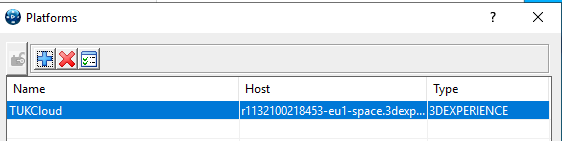
-
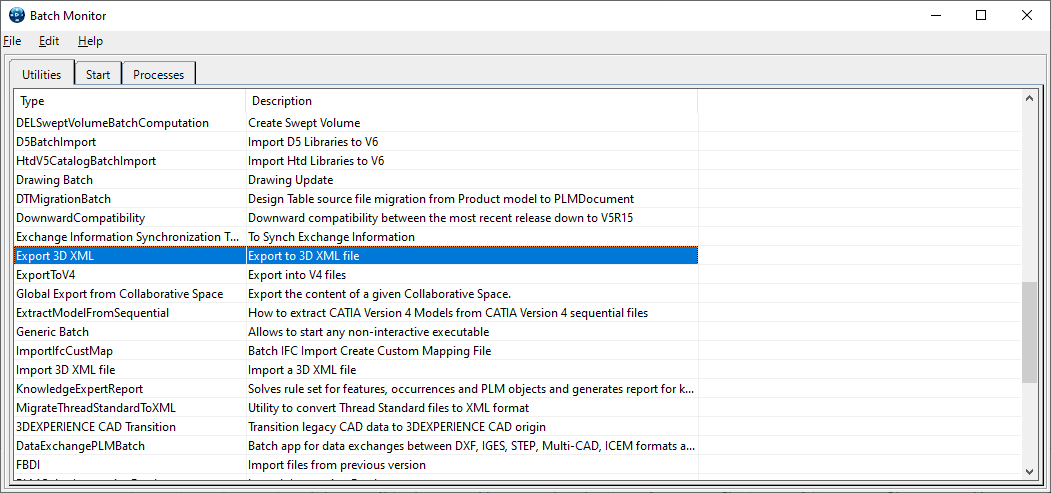
Export 3DXML.
Define the data to extract and save the template. (we will save the template to D:\temp\template.xml)
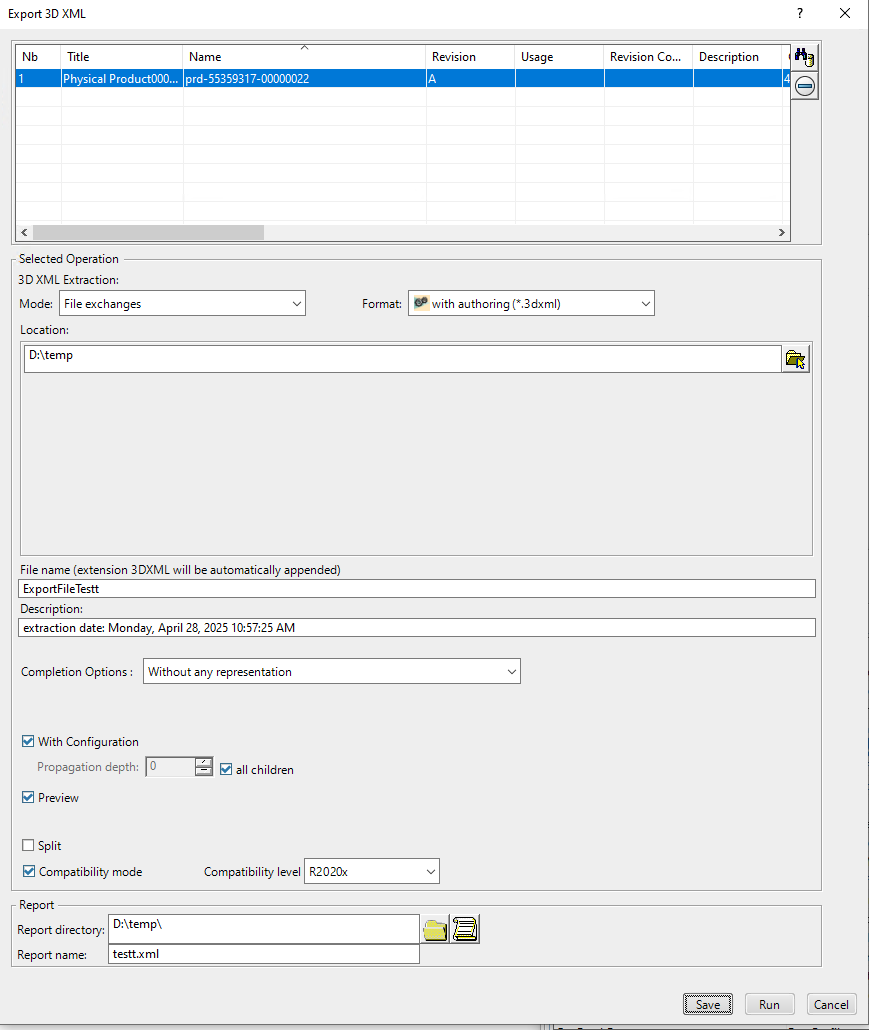
The following is an example of a CATIA Batch command XML template:
<?xml version='1.0' encoding='UTF-8' ?>
<!DOCTYPE root SYSTEM "Parameters.dtd">

<root batch_name = "ExportPLMBriefcaseBatch" user = "" password = "" env = "" version = "6 425 3 27 06-14-2023.15.25" licfile = "">
<inputParameters>
<![CDATA[

<ServerLicence_PLM1>AAAAIAAAABhBY2NlcHRJcnJlbGV2YW50U2VhcmNoZXMAAAAAAAAABUZhbHNlAAAAGUF1dGhlbnRpZmljYXRpb24uUGFzc3dvcmQAAAAAAAAAFERlZmF1bHRfU1NPX1Bhc3N3b3JkAAAAFUF1dGhlbnRpZmljYXRpb24uVXNlcgAAAAAAAAAHbHQ2MzA4OQAAAAZDYXNVcmwAAAAAAAAAQmh0dHBzOi8vcjExMzIxMDE1NjUxNjYtZXUxLXAyMjA4MDAxMHMuaWFtLjNkZXhwZXJpZW5jZS4zZHMuY29tOjQ0MwAAABRDaGFuZ2VMb2dPbkZsYXRUYWJsZQAAAAAAAAAEVHJ1ZQAAACZEZWZhdWx0QWR2YW5jZWRTZWFyY2hBY3RpdmF0ZWRGb3JRdWVyeQAAAAAAAAADWWVzAAAAHkRlZmF1bHRDYXNlU2Vuc2l0aXZpdHlGb3JRdWVyeQAAAAAAAAANQ2FzZVNlbnNpdGl2ZQAAABZFbnZpcm9ubWVudC5TZXJ2ZXJOYW1lAAAAAAAAADhyMTEzMjEwMTU2NTE2Ni1ldTEtcDIyMDgwMDEwcy1zcGFjZS4zZGV4cGVyaWVuY2UuM2RzLmNvbQAAABZFbnZpcm9ubWVudC5TZXJ2ZXJQb3J0AAAAAAAAAAM0NDMAAAAaRW52aXJvbm1lbnQuU2VydmVyUHJvdG9jb2wAAAAAAAAABWh0dHBzAAAAD0Vudmlyb25tZW50LlVSSQAAAAAAAAAGZW5vdmlhAAAAC05hbWVNYXBwaW5nAAAAAAAAAAJObwAAAA5PbmxpbmVJbnN0YW5jZQAAAAAAAAAOUjExMzIxMDE1NjUxNjYAAAALUGh5c1JlcG8uSWQAAAAAAAAAIEM3NjEwRTNENDFEODRBNUNCRDdFMDlCMUM3NjAzMzU4AAAADVBoeXNSZXBvLk5hbWUAAAAAAAAAEU15IFBMTSBSZXBvc2l0b3J5AAAAFVNFQ1VSSVRZX0NPTlRFWFRfVVVJRAAAAAAAAAAgRTExRjM1NEMwMDAwMjQ1ODY0QUVBRjRGMDAwMDAwNDEAAAAQU2VjdXJpdHkuQ29udGV4dAAAAAAAAAAmVlBMTVByb2plY3RMZWFkZXIuQ29tcGFueSBOYW1lLlRTVF9TRVAAAAAQU2VjdXJpdHkuRXh0QXV0aAAAAAAAAAAEdHJ1ZQAAABFTZWN1cml0eS5Mb2NhdGlvbgAAAAAAAAAJcHJlZmVycmVkAAAAFFNlY3VyaXR5LkxvZ2luVGlja2V0AAAAAAAAAFBRek0wUmpFNE1VUTBRalUyTkVNMU5rSTBSVVkxTWpNMk4wVTVOVVZCTUVWOGJIUTJNekE0T1h4OFVqRXhNekl4TURFMU5qVXhOalo4ZkRCOAAAABFTZWN1cml0eS5Tb2x1dGlvbgAAAAAAAAAEVGVhbQAAAA5TZWN1cml0eS5Ub2tlbgAAAAAAAAAubHQ2MzA4OXxWUExNUHJvamVjdExlYWRlci5Db21wYW55IE5hbWUuVFNUX1NFUAAAABhTZWN1cml0eS5UcmFuc2llbnRDYXNUR0MAAAAAAAABGGh0dHBzOi8vcjExMzIxMDE1NjUxNjYtZXUxLXAyMjA4MDAxMHMuaWFtLjNkZXhwZXJpZW5jZS4zZHMuY29tL2FwaS9sb2dpbi9jYXMvdHJhbnNpZW50P3RndD1UR1QtMjU0MTc5OS1leFFVdEtOcGk2cWNIbmJIeVRDbWdxRjBvWFQ3Y01kdVhvWmpxdXpsYnFRdHdlb2ZaMC1jYXMmc2VydmljZT1odHRwcyUzQSUyRiUyRnIxMTMyMTAxNTY1MTY2LWV1MS1wMjIwODAwMTBzLXNwYWNlLjNkZXhwZXJpZW5jZS4zZHMuY29tJTNBNDQzJTJGZW5vdmlhJTJGJTNGdGVuYW50JTNEUjExMzIxMDE1NjUxNjYAAAATU2VydmVySW5zdGFsbGVkVHlwZQAAAAAAAAADVlBNAAAAD1NlcnZlckxvZ2luRGF0ZQAAAAAAAAAKMTY4OTE3MjU0MgAAABNTZXJ2ZXJWZXJzaW9uLk1ham9yAAAAAAAAAAM0MjUAAAATU2VydmVyVmVyc2lvbi5NaW5vcgAAAAAAAAADNDI1AAAAD1Y2UHJvdmlkZXJMZXZlbAAAAAAAAAACdjIAAAAPVlBMTVNhdmVNYXhTaXplAAAAAAAAAAU0NzAwMAAAAAdjdXJfb3JnAAAAAAAAAAxDb21wYW55IE5hbWUAAAAHY3VyX3ByagAAAAAAAAAHVFNUX1NFUAAAAAhjdXJfcm9sZQAAAAAAAAARVlBMTVByb2plY3RMZWFkZXI=</ServerLicence_PLM1>

<inputDataLocation>PLM1
     <PLM1SelectObj>(?xml version="1.0" encoding="UTF-8"?)(FILTER CASESENSITIVE="TRUE" DEPTH="-1" RESULTSPERPAGE="-1" COMMAND="QUERY" )(SELECT)(OBJECT TYPENAME="VPMReference")(ATTRIBUTE NAME="V_Name"/)(ATTRIBUTE NAME="PLM_ExternalID"/)(ATTRIBUTE NAME="revision"/)(ATTRIBUTE NAME="V_versionComment"/)(ATTRIBUTE NAME="V_description"/)(ATTRIBUTE NAME="originated"/)(ATTRIBUTE NAME="V_fromExternalID"/)(ATTRIBUTE NAME="V_Scale"/)(ATTRIBUTE NAME="policy"/)(ATTRIBUTE NAME="modified"/)(ATTRIBUTE NAME="current"/)(ATTRIBUTE NAME="reservedby"/)(ATTRIBUTE NAME="owner"/)(ATTRIBUTE NAME="organization"/)(ATTRIBUTE NAME="project"/)(ATTRIBUTE NAME="V_IsManufacturable"/)(/OBJECT)(/SELECT)(WHERE)(CONDITION OPERATOR="AND")(EXPRESSION TYPENAME="VPMReference" ATTRIBUTE="minorrevision" OP="EQ" TYPE="STRING")(VALUE)(/VALUE)(/EXPRESSION)(EXPRESSION TYPENAME="VPMReference" ATTRIBUTE="majorrevision" OP="EQ" TYPE="STRING")(VALUE)A(/VALUE)(/EXPRESSION)(EXPRESSION TYPENAME="VPMReference" ATTRIBUTE="PLM_ExternalID" OP="EQ" TYPE="STRING")(VALUE)${ObjID}(/VALUE)(/EXPRESSION)(/CONDITION)(/WHERE)(/FILTER)</PLM1SelectObj>
</inputDataLocation>

<checker_input>
<checker>Export 3D XML
     <FileName>${OutFileName}</FileName>
     <FilePath>${OutFilePath}</FilePath>
     <FileDesc>extraction date: mercredi 12 juillet 2023 16:36:52</FileDesc>
     <REP3DShapeObject>All</REP3DShapeObject>
     <Mode>File Exchanges</Mode>
     <Format>WithAuthoring</Format>
     <PropagateDepth>ALL</PropagateDepth>
     <Export3DXML_WithoutWireFrame>NO</Export3DXML_WithoutWireFrame>
     <Export3DXML_SendConfiguration>YES</Export3DXML_SendConfiguration>
     <Export3DXML_Preview>NO</Export3DXML_Preview>
     <Export3DXML_LibraryContent>NO</Export3DXML_LibraryContent>
     <EXPORT_SPLIT>NO</EXPORT_SPLIT>
     <COMPATIBILITY_MODE>NO</COMPATIBILITY_MODE>
     <COMPATIBILITY_LEVEL></COMPATIBILITY_LEVEL>
</checker>
</checker_input>

<Connection>
     <Connected_PLM1>TFQ2MzA4OSAgIEV4cG9ydCAzRCBYTUwgICAgICAgICAgICAgICAgIDIwMjMuMDcuMTItMTY6MzY6NTEgAAAAIAAAABhBY2NlcHRJcnJlbGV2YW50U2VhcmNoZXMAAAAAAAAABUZhbHNlAAAAGUF1dGhlbnRpZmljYXRpb24uUGFzc3dvcmQAAAAAAAAAFERlZmF1bHRfU1NPX1Bhc3N3b3JkAAAAFUF1dGhlbnRpZmljYXRpb24uVXNlcgAAAAAAAAAHbHQ2MzA4OQAAAAZDYXNVcmwAAAAAAAAAQmh0dHBzOi8vcjExMzIxMDE1NjUxNjYtZXUxLXAyMjA4MDAxMHMuaWFtLjNkZXhwZXJpZW5jZS4zZHMuY29tOjQ0MwAAABRDaGFuZ2VMb2dPbkZsYXRUYWJsZQAAAAAAAAAEVHJ1ZQAAACZEZWZhdWx0QWR2YW5jZWRTZWFyY2hBY3RpdmF0ZWRGb3JRdWVyeQAAAAAAAAADWWVzAAAAHkRlZmF1bHRDYXNlU2Vuc2l0aXZpdHlGb3JRdWVyeQAAAAAAAAANQ2FzZVNlbnNpdGl2ZQAAABZFbnZpcm9ubWVudC5TZXJ2ZXJOYW1lAAAAAAAAADhyMTEzMjEwMTU2NTE2Ni1ldTEtcDIyMDgwMDEwcy1zcGFjZS4zZGV4cGVyaWVuY2UuM2RzLmNvbQAAABZFbnZpcm9ubWVudC5TZXJ2ZXJQb3J0AAAAAAAAAAM0NDMAAAAaRW52aXJvbm1lbnQuU2VydmVyUHJvdG9jb2wAAAAAAAAABWh0dHBzAAAAD0Vudmlyb25tZW50LlVSSQAAAAAAAAAGZW5vdmlhAAAAC05hbWVNYXBwaW5nAAAAAAAAAAJObwAAAA5PbmxpbmVJbnN0YW5jZQAAAAAAAAAOUjExMzIxMDE1NjUxNjYAAAALUGh5c1JlcG8uSWQAAAAAAAAAIEM3NjEwRTNENDFEODRBNUNCRDdFMDlCMUM3NjAzMzU4AAAADVBoeXNSZXBvLk5hbWUAAAAAAAAAEU15IFBMTSBSZXBvc2l0b3J5AAAAFVNFQ1VSSVRZX0NPTlRFWFRfVVVJRAAAAAAAAAAgRTExRjM1NEMwMDAwMjQ1ODY0QUVBRjRGMDAwMDAwNDEAAAAQU2VjdXJpdHkuQ29udGV4dAAAAAAAAAAmVlBMTVByb2plY3RMZWFkZXIuQ29tcGFueSBOYW1lLlRTVF9TRVAAAAAQU2VjdXJpdHkuRXh0QXV0aAAAAAAAAAAEdHJ1ZQAAABFTZWN1cml0eS5Mb2NhdGlvbgAAAAAAAAAJcHJlZmVycmVkAAAAFFNlY3VyaXR5LkxvZ2luVGlja2V0AAAAAAAAAFBRek0wUmpFNE1VUTBRalUyTkVNMU5rSTBSVVkxTWpNMk4wVTVOVVZCTUVWOGJIUTJNekE0T1h4OFVqRXhNekl4TURFMU5qVXhOalo4ZkRCOAAAABFTZWN1cml0eS5Tb2x1dGlvbgAAAAAAAAAEVGVhbQAAAA5TZWN1cml0eS5Ub2tlbgAAAAAAAAAubHQ2MzA4OXxWUExNUHJvamVjdExlYWRlci5Db21wYW55IE5hbWUuVFNUX1NFUAAAABhTZWN1cml0eS5UcmFuc2llbnRDYXNUR0MAAAAAAAABGGh0dHBzOi8vcjExMzIxMDE1NjUxNjYtZXUxLXAyMjA4MDAxMHMuaWFtLjNkZXhwZXJpZW5jZS4zZHMuY29tL2FwaS9sb2dpbi9jYXMvdHJhbnNpZW50P3RndD1UR1QtMjU0MTc5OS1leFFVdEtOcGk2cWNIbmJIeVRDbWdxRjBvWFQ3Y01kdVhvWmpxdXpsYnFRdHdlb2ZaMC1jYXMmc2VydmljZT1odHRwcyUzQSUyRiUyRnIxMTMyMTAxNTY1MTY2LWV1MS1wMjIwODAwMTBzLXNwYWNlLjNkZXhwZXJpZW5jZS4zZHMuY29tJTNBNDQzJTJGZW5vdmlhJTJGJTNGdGVuYW50JTNEUjExMzIxMDE1NjUxNjYAAAATU2VydmVySW5zdGFsbGVkVHlwZQAAAAAAAAADVlBNAAAAD1NlcnZlckxvZ2luRGF0ZQAAAAAAAAAKMTY4OTE3MjU0MgAAABNTZXJ2ZXJWZXJzaW9uLk1ham9yAAAAAAAAAAM0MjUAAAATU2VydmVyVmVyc2lvbi5NaW5vcgAAAAAAAAADNDI1AAAAD1Y2UHJvdmlkZXJMZXZlbAAAAAAAAAACdjIAAAAPVlBMTVNhdmVNYXhTaXplAAAAAAAAAAU0NzAwMAAAAAdjdXJfb3JnAAAAAAAAAAxDb21wYW55IE5hbWUAAAAHY3VyX3ByagAAAAAAAAAHVFNUX1NFUAAAAAhjdXJfcm9sZQAAAAAAAAARVlBMTVByb2plY3RMZWFkZXI=</Connected_PLM1>
</Connection>
]]>
</inputParameters>
<outputParameters>
<folder id = "targetDir" destination = "C:\Users\LT63089\Documents\_eDEV_3DX\SCRIPT\3DX_Batch_Launcher\EXPORT\" folderPath = "C:\Users\LT63089\Documents\_eDEV_3DX\SCRIPT\3DX_Batch_Launcher\EXPORT\" type = "bin" upLoadable = "RightNow" extension = "*" automatic = "1"/>
<![CDATA[

 <ReportName>GlobalResults</ReportName>
]]>
</outputParameters>
<PCList>
<PC name="TER" />
<PC name="EM0" />
<PC name="TER" />
<PC name="EM0" />
<PC name="EM0" />
</PCList>
</root>
It is possible to write/generate more dynamic XML templates using TIF capabilities. For example, if the job should be able to be used on any object. We could make tif pass that info to the template. This is not covered in this tutorial.
CATIA Connection Info
To be able to run the command without any user interaction we need to modify the xml template to use generic connection info that we will then specify in the CATIA environment file.
XML Template Modifications
Replace the content of the <ServerLicence_PLM1> and <Connected_PLM1> tags with the string PLMBATCH_EXTERNAL_CONNECTION in the template.xml file.
CATIA Environment Variables
The environment file is located in the CATIA installation folder. The file is named Env.txt and is located in the CATEnv folder.
(it is also possible to use a custom environment file, that then needs to be referenced to in the batch command, e.g. env MyCustomEnvFilename -direnv "C:\Program Files\Dassault Systemes\B424_Cloud\CATEnv" ).
Set the following environment variables in the Env.txt file:
-
user credentials
-
server name and port number
-
login token
-
other necessary parameters
PLMBATCH_Connect_PLM1_User=admin_platform
PLMBATCH_Connect_PLM1_xPwd=enoviaV6
PLMBATCH_Connect_PLM1_Role=VPLMProjectLeader
PLMBATCH_Connect_PLM1_Serv=24xdev.technia.net:443
PLMBATCH_Connect_PLM1_iURL=3dspace
PLMBATCH_Connect_PLM1_Protocol=https
PLMBATCH_Connect_PLM1_LoginTicket=REMwMTA5NjRDODc2NEM3Q0EwNzU0NjNFQzdEOTJFRjR8YWRtaW5fcGxhdGZvcm18fHx8MHw

PLMBATCH_NoPLMStream=1
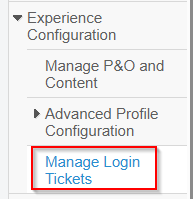
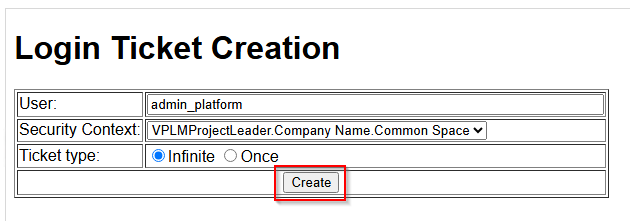
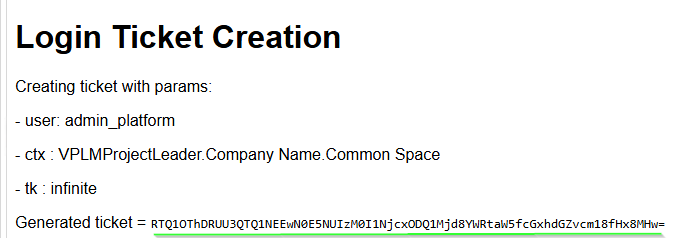
To get/generate the login ticket/token you can do the following in the 3dx app: navigate to Experience Configuration > Manage Login Tickets and generate a new login ticket. Copy the generated token and paste it in the Env.txt file parameter PLMBATCH_Connect_PLM1_LoginTicket=.
Example:
!----------------------------------------------------------
!   DASSAULT SYSTEMES  -  ENVIRONMENT FILE
!----------------------------------------------------------
! MODE : Global
! PRODUCT LINE : COMMON
! TMSTMP : 1740565469
! ARGS :
! MARKETING VERSION :
!----------------------------------------------------------

!- these environment variables are needed to build the <Connected_PLM1> string
PLMBATCH_Connect_PLM1_User=admin_platform
PLMBATCH_Connect_PLM1_xPwd=enoviaV6
PLMBATCH_Connect_PLM1_Role=VPLMProjectLeader
PLMBATCH_Connect_PLM1_Serv=24xdev.technia.net:443
PLMBATCH_Connect_PLM1_iURL=3dspace
PLMBATCH_Connect_PLM1_Protocol=https

PLMBATCH_Connect_PLM1_LoginTicket=REMwMTA5NjRDODc2NEM3Q0EwNzU0NjNFQzdEOTJFRjR8YWRtaW5fcGxhdGZvcm18fHx8MHw

!- with this environment variable, the <ServerLicence_PLM1> is exported in plaintext
PLMBATCH_NoPLMStream=1
!PLMBATCH_NoPLMIDStream=1

!- when graphics card is not certified, set this variable to 1 to avoid the warning message
CATForceNotCertifiedGraphics=1

!- usen when using cloud setup
!MyAppsURL=https://eu1-apps.3dexperience.3ds.com:443/enovia/resources/AppsMngt

CATInstallPath=C:\Users\Public\Documents\Dassault Systemes\UserCache\B426\%DSY_TENANT%\win_b64;C:\Program Files\Dassault Systemes\B426\win_b64
CATDLLPath=C:\Users\Public\Documents\Dassault Systemes\UserCache\B426\%DSY_TENANT%\win_b64\code\bin;C:\Program Files\Dassault Systemes\B426\win_b64\code\bin
CATICPath=C:\Users\Public\Documents\Dassault Systemes\UserCache\B426\%DSY_TENANT%\win_b64\code\productIC;C:\Program Files\Dassault Systemes\B426\win_b64\code\productIC
CATCommandPath=C:\Users\Public\Documents\Dassault Systemes\UserCache\B426\%DSY_TENANT%\win_b64\code\command;C:\Program Files\Dassault Systemes\B426\win_b64\code\command
CATDictionaryPath=C:\Users\Public\Documents\Dassault Systemes\UserCache\B426\%DSY_TENANT%\win_b64\code\dictionary;C:\Program Files\Dassault Systemes\B426\win_b64\code\dictionary
CATReffilesPath=C:\Users\Public\Documents\Dassault Systemes\UserCache\B426\%DSY_TENANT%\win_b64\reffiles;C:\Program Files\Dassault Systemes\B426\win_b64\reffiles
CATFontPath=C:\Users\Public\Documents\Dassault Systemes\UserCache\B426\%DSY_TENANT%\win_b64\resources\fonts;C:\Program Files\Dassault Systemes\B426\win_b64\resources\fonts
CATGalaxyPath=C:\Users\Public\Documents\Dassault Systemes\UserCache\B426\%DSY_TENANT%\win_b64\resources\galaxy;C:\Program Files\Dassault Systemes\B426\win_b64\resources\galaxy
CATGraphicPath=C:\Users\Public\Documents\Dassault Systemes\UserCache\B426\%DSY_TENANT%\win_b64\resources\AppDescription;C:\Program Files\Dassault Systemes\B426\win_b64\resources\AppDescription;C:\Users\Public\Documents\Dassault Systemes\UserCache\B426\%DSY_TENANT%\win_b64\resources\graphic;C:\Program Files\Dassault Systemes\B426\win_b64\resources\graphic;C:\Users\Public\Documents\Dassault Systemes\UserCache\B426\%DSY_TENANT%\win_b64\resources\graphic\icons;C:\Program Files\Dassault Systemes\B426\win_b64\resources\graphic\icons;C:\Users\Public\Documents\Dassault Systemes\UserCache\B426\%DSY_TENANT%\win_b64\resources\graphic\figures;C:\Program Files\Dassault Systemes\B426\win_b64\resources\graphic\figures;C:\Users\Public\Documents\Dassault Systemes\UserCache\B426\%DSY_TENANT%\win_b64\resources\graphic\splashscreens;C:\Program Files\Dassault Systemes\B426\win_b64\resources\graphic\splashscreens;C:\Users\Public\Documents\Dassault Systemes\UserCache\B426\%DSY_TENANT%\win_b64\resources\graphic\symbols;C:\Program Files\Dassault Systemes\B426\win_b64\resources\graphic\symbols;C:\Users\Public\Documents\Dassault Systemes\UserCache\B426\%DSY_TENANT%\win_b64\resources\graphic\textures;C:\Program Files\Dassault Systemes\B426\win_b64\resources\graphic\textures
CATMsgCatalogPath=C:\Users\Public\Documents\Dassault Systemes\UserCache\B426\%DSY_TENANT%\win_b64\resources\msgcatalog;C:\Program Files\Dassault Systemes\B426\win_b64\resources\msgcatalog
CATFeatureCatalogPath=C:\Users\Public\Documents\Dassault Systemes\UserCache\B426\%DSY_TENANT%\win_b64\resources\featurecatalog;C:\Program Files\Dassault Systemes\B426\win_b64\resources\featurecatalog
CATDefaultCollectionStandard=C:\Users\Public\Documents\Dassault Systemes\UserCache\B426\%DSY_TENANT%\win_b64\resources\standard;C:\Program Files\Dassault Systemes\B426\win_b64\resources\standard
CATKnowledgePath=C:\Users\Public\Documents\Dassault Systemes\UserCache\B426\%DSY_TENANT%\win_b64\resources\knowledge;C:\Program Files\Dassault Systemes\B426\win_b64\resources\knowledge
CATStartupPath=C:\Users\Public\Documents\Dassault Systemes\UserCache\B426\%DSY_TENANT%\win_b64\startup;C:\Program Files\Dassault Systemes\B426\win_b64\startup
CATW3ResourcesPath=C:\Users\Public\Documents\Dassault Systemes\UserCache\B426\%DSY_TENANT%\win_b64\docs;C:\Program Files\Dassault Systemes\B426\win_b64\docs
CATReconcilePath=
CATReferenceSettingPath=C:\Users\Public\Documents\Dassault Systemes\UserCache\B426\%DSY_TENANT%\win_b64\startup\Settings;C:\Program Files\Dassault Systemes\B426\win_b64\startup\Settings
CATUserSettingPath=CSIDL_APPDATA\DassaultSystemes\CATSettings\DSKEY_RELEASE_LEVEL\Desktop
CATCollectionStandard=
CATTemp=CSIDL_LOCAL_APPDATA\DassaultSystemes\CATTemp
CATErrorLog=CSIDL_LOCAL_APPDATA\DassaultSystemes\CATTemp\error.log
CATReport=CSIDL_LOCAL_APPDATA\DassaultSystemes\CATReport
CATDisciplinePath=
USER_HOME=CSIDL_PERSONAL
JAVA_HOME=%JAVA_HOME%
CLASSPATH_JDBC=
CLASSPATH=%CLASSPATH_JDBC%;%CLASSPATH%
PATH=C:\Users\Public\Documents\Dassault Systemes\UserCache\B426\%DSY_TENANT%\win_b64\code\bin;C:\Program Files\Dassault Systemes\B426\win_b64\code\bin;C:\Users\Public\Documents\Dassault Systemes\UserCache\B426\%DSY_TENANT%\win_b64\code\command;C:\Program Files\Dassault Systemes\B426\win_b64\code\command;C:\Users\Public\Documents\Dassault Systemes\UserCache\B426\%DSY_TENANT%\win_b64\code\bin_trusted;C:\Program Files\Dassault Systemes\B426\win_b64\code\bin_trusted;C:\Users\Public\Documents\Dassault Systemes\UserCache\B426\%DSY_TENANT%\win_b64\code\command_trusted;C:\Program Files\Dassault Systemes\B426\win_b64\code\command_trusted;%JAVA_HOME%\bin;%PATH%
DPCRuntimeView=C:\Users\Public\Documents\Dassault Systemes\UserCache\B426\%DSY_TENANT%
Integration Configuration / TIF Job Configuration
To run the CATIA Batch command, we need to create a TIF job configuration file. The job configuration file should contain the necessary parameters for the CATIA Batch command using External Process.
The input parameter should be the XML template we created in the previous step. The output parameter should be the folder where we want to save the output files.
Job configuration:
<Job xmlns="http://technia.com/TIF/JobCfg" xmlns:xsi="http://www.w3.org/2001/XMLSchema-instance"
    xmlns:cmn="http://technia.com/TIF/Common" xmlns:payload="http://technia.com/TIF/Payload" xmlns:modifier="http://technia.com/TIF/FileModifier"
    xsi:schemaLocation="http://technia.com/TIF/JobCfg file:///C:/projects/tif/enovia/server/src/main/xsd/JobCfg.xsd">
    <ExternalProcess>
        <Exec>
            <Executable>C:\Program Files\Dassault Systemes\B426\win_b64\code\bin\CATBatchStarter.exe</Executable>
            <Arguments>
                <Arg>-input "D:\temp\template.xml"</Arg>
                <Arg>-output "D:\temp\out"</Arg>
                <Arg>-verbose</Arg>
            </Arguments>
        </Exec>
    </ExternalProcess>
</Job>
This is/would be equivalent to running the following command in a command prompt:
"C:\Program Files\Dassault Systemes\B426\win_b64\code\bin\CATBatchStarter.exe" -input "D:\temp\template.xml" -output "D:\temp\out" -verbose