 TVC Helium 2025.3.0
<Setting name="options">{
	"filter": {
		"useMultiValueFilter": true,
		"position": "belowColumnHeader"
	}
}</Setting>TVC Helium 2025.2.2 Release Information
04 July 2025
The following issue has been fixed in this release
| Issue | Description |
|---|---|
HE-4249,TCC-23341 |
Improvement on Advance Filter (Multi Value Helium Table). |
HE-4278,TCC-29113 |
Conflict Between ValidFor and Access Role Tag in helium command. |
HE-4264,TCC-29790 |
Add capability’s to use placeholders helium form’s Autocomplete fields. |
HE-4277,TCC-29792 |
Make Helium Modals Responsive to Different Screen Sizes. |
HE-4288, TCC-30684 |
Missing Icons for Push Subscriptions in Helium 2025.2.0 Release. |
HE-4293, HE-4298, TCC-30782 |
Push subscription command is not working without invokeServiceCallbacks, Push Subscription improvements. |
1. DataTable
1.1. Multi-Value column filter
Helium now supports multi-value dropdown filtering for string-based columns (that don’t use range values) in DataTables. Users can filter column data by selecting multiple values from a dropdown populated with attribute values.
For client-side processing, only the values actually present in the column data can be displayed in the dropdown.
We have enhanced the filter positioning feature. Now, filters can be placed below the column header in the DataTable.
The valid value for this position is "belowColumnHeader".
This can be configured as below :
For server-side processing, a static list of comma-separated values should be defined, which will be rendered as a dropdown on the UI. This allows users to filter data specific to that column. This can be configured as below :
<Setting name="options">{
	"filter": {
		"useMultiValueFilter": true,
		"position": "belowColumnHeader",
		"values": "Part, Mechanical part, Drawing Print"
	}
}</Setting>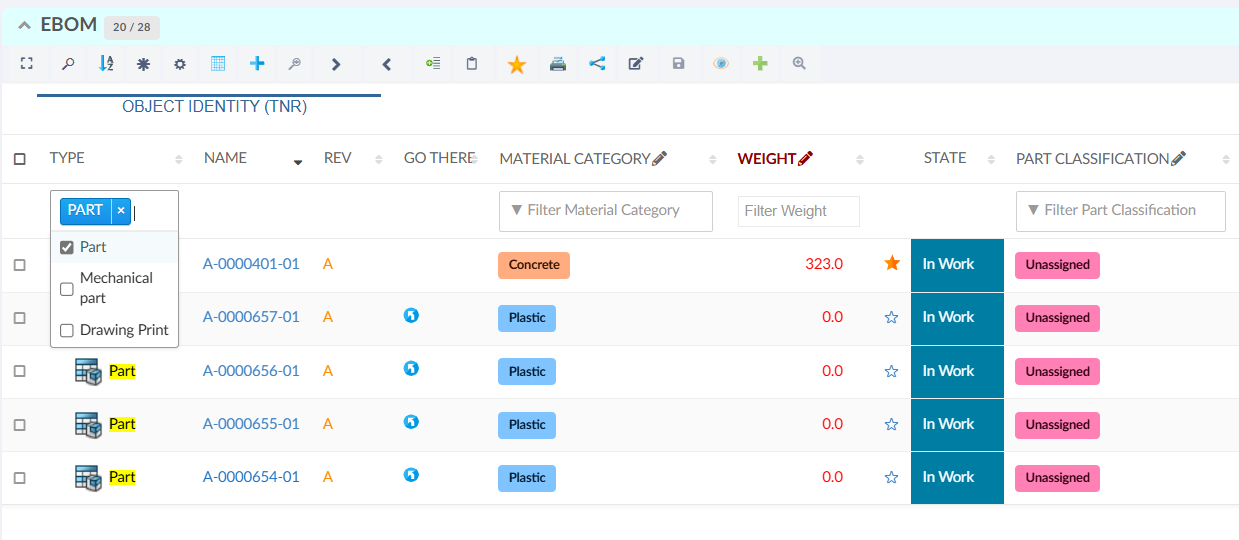
Figure 1. Multi-Value column filter
Additionally, we can define a callback that invokes a custom JavaScript function. This function can make an AJAX call and return a JavaScript object, whose values will be used to populate the dropdown dynamically for column-based filtering. This can be configured as below :
<Setting name="options">{
	"filter": {
		...
		"useMultiValueFilter": true,
		"values": "App.hex.setListUsingAsyncFunction"
	}
}</Setting>
Read more about Datatable-ColumnFilter for more details.