 TVC Classic - 2025.2.0
<Column>
    <Name>Dynamic Attribute</Name>
    <GroupHeader>emxFramework.Type.Attribute_Group</GroupHeader>
    <RegisteredSuite>Framework</RegisteredSuite>
    <Alt>Dynamic Attributes</Alt>
    <ColumnType>dynamicAttributes</ColumnType>
    <Setting name="Interface Selectable">interface</Setting>
</Column>TVC 2025.1.0 Release Information
28 February 2025
Table of Contents
2. Structure Browser
2.1. Dynamic Attribute Columns
In a table configuration, columns corresponding to interface attributes can be dynamically created based on the interfaces associated with the context object. The column definition allows specifying how these dynamic attributes should be determined.
2.1.1. Column Definition Example
| If a table is loaded from the result of a search form, it will display classification interface attributes based on the classification field value selected in the search form. |
2.1.2. Explanation of Settings
- Explicit Interface Selection
-
If specific interface attributes need to be displayed as columns, use the interface setting:
<Setting name="interface">interface1,interface2</Setting>This ensures that only attributes from the specified interfaces (interface1, interface2) are included as dynamic columns.
- Root Object Associated Interfaces
-
To use the interfaces associated with the table’s root object dynamically, set:
<Setting name="Interface Selectable">interface</Setting>This setting ensures that the table dynamically retrieves attributes from the interfaces assigned to the root object.
- Default Behavior
-
By default,
Interface Selectableis set to:
<Setting name="Interface Selectable">attribute[mxsysInterface]</Setting>This default setting supports classified items view along with its attribute values within the library classes context.
| Unless "Interface Selectable" is explicitly overridden, the system retrieves interface attributes based on the mxsysInterface attribute of the root object |
Example view of Classified Item in Library context
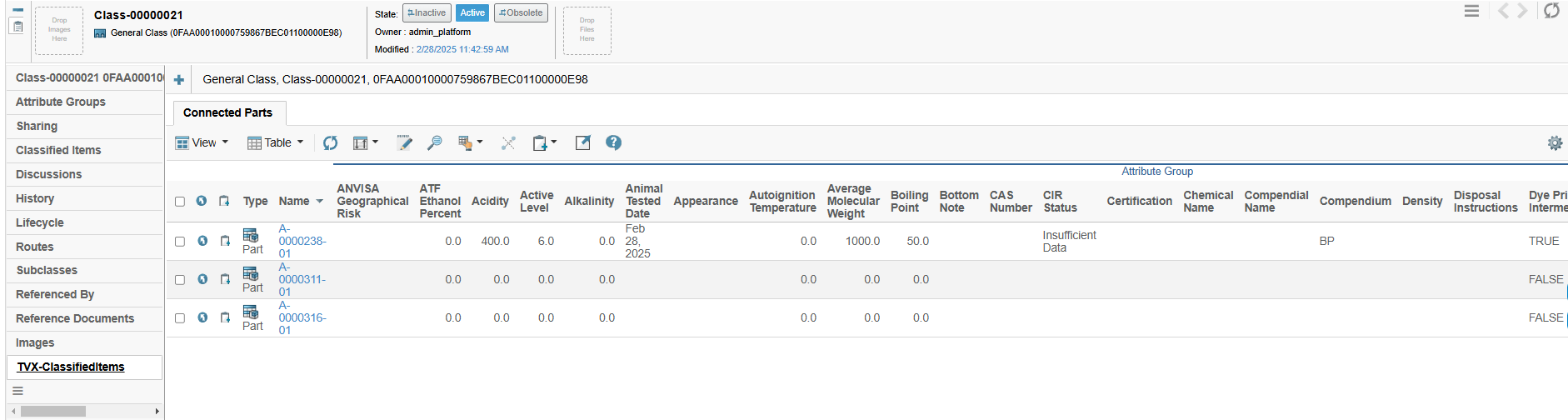
Figure 1. Classified Item View with attribute values in Library context
2.2. Invoke Expand Mode
The Invoke Expand Mode has been introduced for tables to retrieve expanded data using Invoke Service configurations. This enables users to dynamically populate expand structures through REST/AJAX services, enhancing flexibility and efficiency in data retrieval.
Configuration: invoke: <Service Configuration>
Example -
invoke:tvc:service:ups/ProgressiveExpandV2.xml
Please refer the Invoke Service configurations link for service configuration.
3. Collaboration
3.1. Show Single Discussion/Workflow on panel load
A specific behavior is required where the details of a discussion or workflow should be displayed when there is only one item in the list. To enable this, set the existing TVC system property tvc.collaboration.panel.showSingleSet to true. This property applies to both the discussion and workflow components.
For cases where this behavior needs to be applied to either the discussion or workflow component individually, the following system properties have been introduced:
| Property | Description | Default Value |
|---|---|---|
tvc.collaboration.discussion.panel.showSingle |
Loads the discussion details when there is only one in the list |
false |
tvc.collaboration.workflow.panel.showSingle |
Loads the workflow details when there is only one in the list |
false |
3.2. Controlling the default value of Retain Worfklow Task Assignee
When a user does the reassign operation on a task, the assignee field is displayed as blank or filled with configured values in the assignee config. Sometimes it creates confusion for the user as it differs from the actual task assignee.
Retain config was introduced for assignee config to show the task assignees in the assignee field during task reassignment. From this release onwards, The default value for retain setting has been changed to false. The default value could be updated using the
tvc.collaboration.workflow.task.assignees.retain TVC system property.
Refer Assignee Config chapter for more details.